Nginx反向代理
Nginx反向代理概述
关于正向代理和反向代理,我们在前面的章节已经通过一张图给大家详细的介绍过了,简而言之就是正向代理代理的对象是客户端,反向代理代理的是服务端,这是两者之间最大的区别。
Nginx即可以实现正向代理,也可以实现反向代理。
我们先来通过一个小案例演示下Nginx正向代理的简单应用。
先提需求:
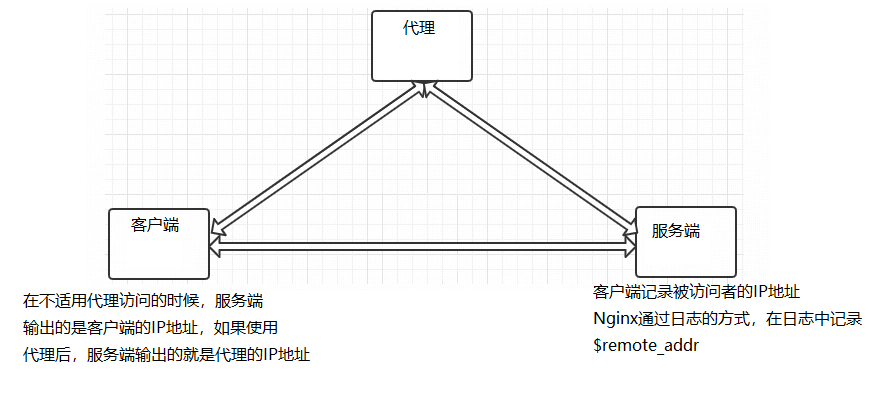
(1)服务端的设置:
1
2
3
4
5
6
7
8
9
10
11
12
| http {
log_format main 'client send request=>clientIp=$remote_addr serverIp=>$host';
server{
listen 80;
server_name localhost;
access_log logs/access.log main;
location {
root html;
index index.html index.htm;
}
}
}
|
(2)使用客户端访问服务端,打开日志查看结果

(3)代理服务器设置:
1
2
3
4
5
6
7
8
9
| server {
listen 82;
resolver 8.8.8.8;
location /{
proxy_pass http://$host$request_uri;
}
}
|
(4)查看代理服务器的IP(192.168.200.146)和Nginx配置监听的端口(82)
(5)在客户端配置代理服务器
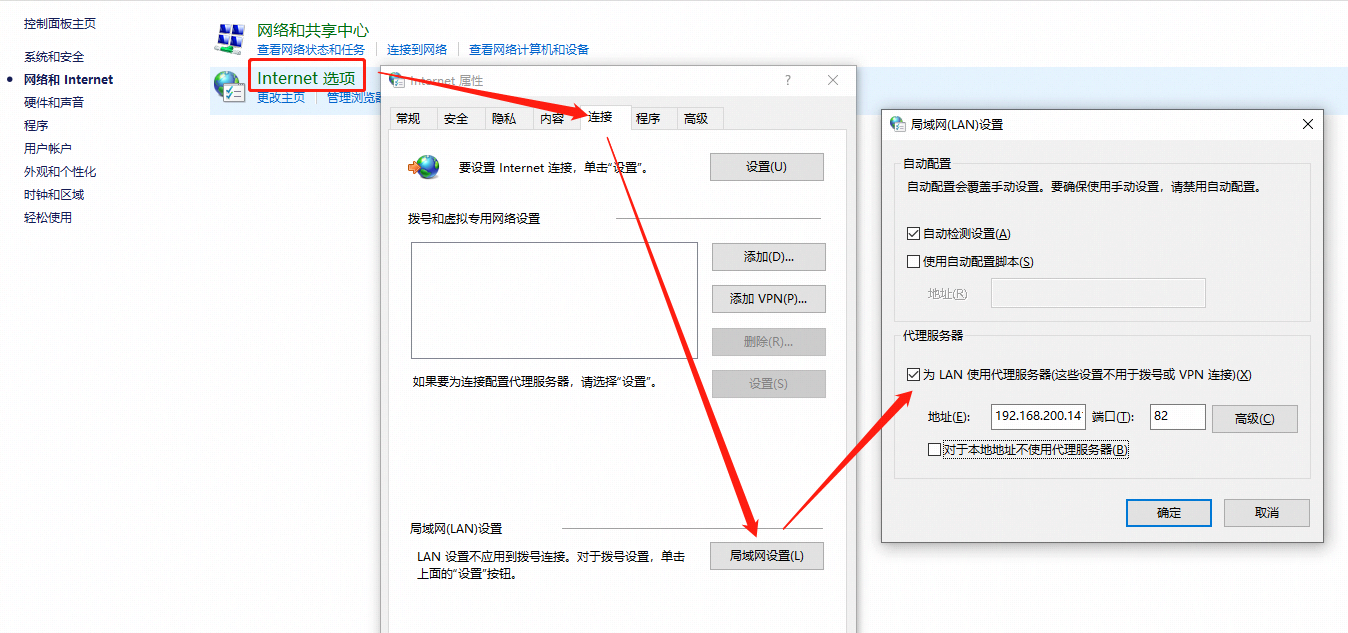
(6)设置完成后,再次通过浏览器访问服务端

通过对比,上下两次的日志记录,会发现虽然我们是客户端访问服务端,但是如何使用了代理,那么服务端能看到的只是代理发送过去的请求,这样的化,就使用Nginx实现了正向代理的设置。
但是Nginx正向代理,在实际的应用中不是特别多,所以我们简单了解下,接下来我们继续学习Nginx的反向代理,这是Nginx比较重要的一个功能。
Nginx反向代理的配置语法
Nginx反向代理模块的指令是由ngx_http_proxy_module模块进行解析,该模块在安装Nginx的时候已经自己加装到Nginx中了,接下来我们把反向代理中的常用指令一一介绍下:
1
2
3
| proxy_pass
proxy_set_header
proxy_redirect
|
proxy_pass
该指令用来设置被代理服务器地址,可以是主机名称、IP地址加端口号形式。
| 语法 |
proxy_pass URL; |
| 默认值 |
— |
| 位置 |
location |
URL:为要设置的被代理服务器地址,包含传输协议(http,https://)、主机名称或IP地址加端口号、URI等要素。
举例:
1
2
3
4
5
6
| proxy_pass http://www.baidu.com;
location /server{}
proxy_pass http://192.168.200.146;
http://192.168.200.146/server/index.html
proxy_pass http://192.168.200.146/;
http://192.168.200.146/index.html
|
大家在编写proxy_pass的时候,后面的值要不要加”/“?
接下来通过例子来说明刚才我们提到的问题:
1
2
3
4
5
6
7
8
9
10
11
12
13
14
15
16
17
18
19
20
| server {
listen 80;
server_name localhost;
location /{
#proxy_pass http://192.168.200.146;
proxy_pass http://192.168.200.146/;
}
}
当客户端访问 http://localhost/index.html,效果是一样的
server{
listen 80;
server_name localhost;
location /server{
#proxy_pass http://192.168.200.146;
proxy_pass http://192.168.200.146/;
}
}
当客户端访问 http://localhost/server/index.html
这个时候,第一个proxy_pass就变成了http://localhost/server/index.html
第二个proxy_pass就变成了http://localhost/index.html效果就不一样了。
|
该指令可以更改Nginx服务器接收到的客户端请求的请求头信息,然后将新的请求头发送给代理的服务器
| 语法 |
proxy_set_header field value; |
| 默认值 |
proxy_set_header Host $proxy_host;
proxy_set_header Connection close; |
| 位置 |
http、server、location |
需要注意的是,如果想要看到结果,必须在被代理的服务器上来获取添加的头信息。
被代理服务器: [192.168.200.146]
1
2
3
4
5
6
| server {
listen 8080;
server_name localhost;
default_type text/plain;
return 200 $http_username;
}
|
代理服务器: [192.168.200.133]
1
2
3
4
5
6
7
8
9
| server {
listen 8080;
server_name localhost;
location /server {
proxy_pass http://192.168.200.146:8080/;
proxy_set_header username TOM;
}
}
|
访问测试
proxy_redirect
该指令是用来重置头信息中的”Location”和”Refresh”的值。
| 语法 |
proxy_redirect redirect replacement;
proxy_redirect default;
proxy_redirect off; |
| 默认值 |
proxy_redirect default; |
| 位置 |
http、server、location |
》为什么要用该指令?
服务端[192.168.200.146]
1
2
3
4
5
6
7
8
| server {
listen 8081;
server_name localhost;
if (!-f $request_filename){
return 302 http://192.168.200.146;
}
}
|
代理服务端[192.168.200.133]
1
2
3
4
5
6
7
8
| server {
listen 8081;
server_name localhost;
location / {
proxy_pass http://192.168.200.146:8081/;
proxy_redirect http://192.168.200.146 http://192.168.200.133;
}
}
|
》该指令的几组选项
proxy_redirect redirect replacement;
1
2
| redirect:目标,Location的值
replacement:要替换的值
|
proxy_redirect default;
1
2
3
| default;
将location块的uri变量作为replacement,
将proxy_pass变量作为redirect进行替换
|
proxy_redirect off;
Nginx反向代理实战
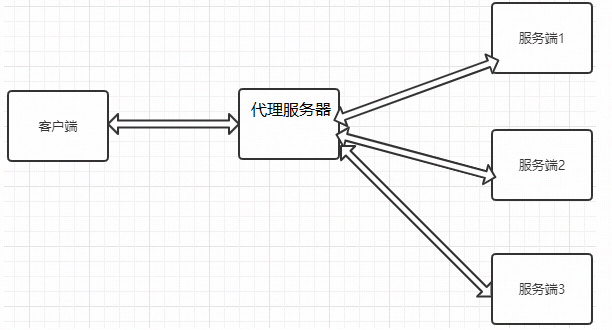
服务器1,2,3存在两种情况
1
2
| 第一种情况: 三台服务器的内容不一样。
第二种情况: 三台服务器的内容是一样。
|
如果服务器1、服务器2和服务器3的内容不一样,那我们可以根据用户请求来分发到不同的服务器。
1
2
3
4
5
6
7
8
9
10
11
12
13
14
15
16
17
18
19
20
21
22
23
24
25
26
27
28
29
30
31
32
33
34
35
36
37
| 代理服务器
server {
listen 8082;
server_name localhost;
location /server1 {
proxy_pass http://192.168.200.146:9001/;
}
location /server2 {
proxy_pass http://192.168.200.146:9002/;
}
location /server3 {
proxy_pass http://192.168.200.146:9003/;
}
}
服务端
server1
server {
listen 9001;
server_name localhost;
default_type text/html;
return 200 '<h1>192.168.200.146:9001</h1>'
}
server2
server {
listen 9002;
server_name localhost;
default_type text/html;
return 200 '<h1>192.168.200.146:9002</h1>'
}
server3
server {
listen 9003;
server_name localhost;
default_type text/html;
return 200 '<h1>192.168.200.146:9003</h1>'
}
|