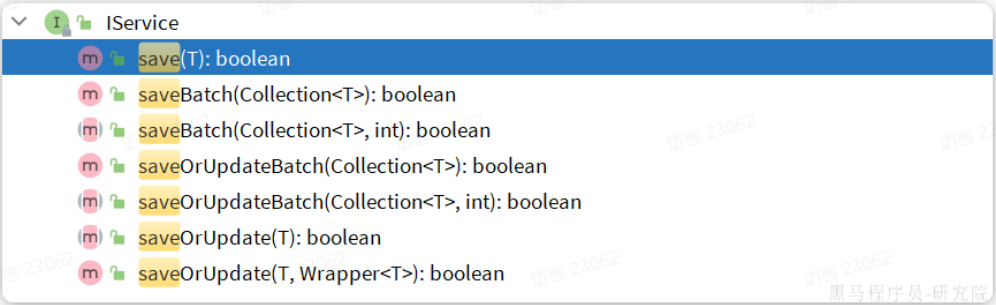
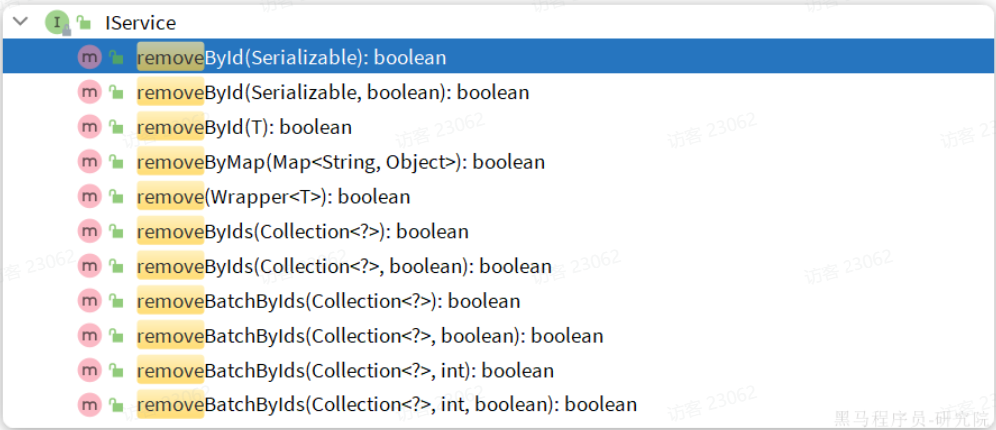
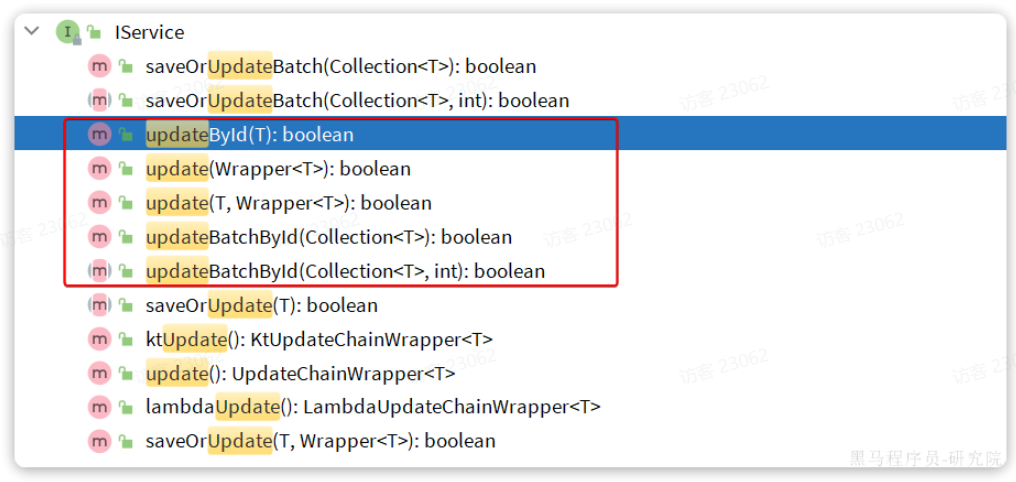
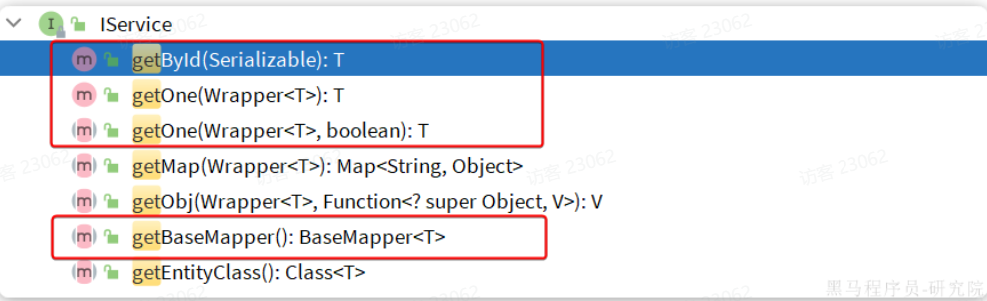
2.核心功能 刚才的案例中都是以id为条件的简单CRUD,一些复杂条件的SQL语句就要用到一些更高级的功能了。
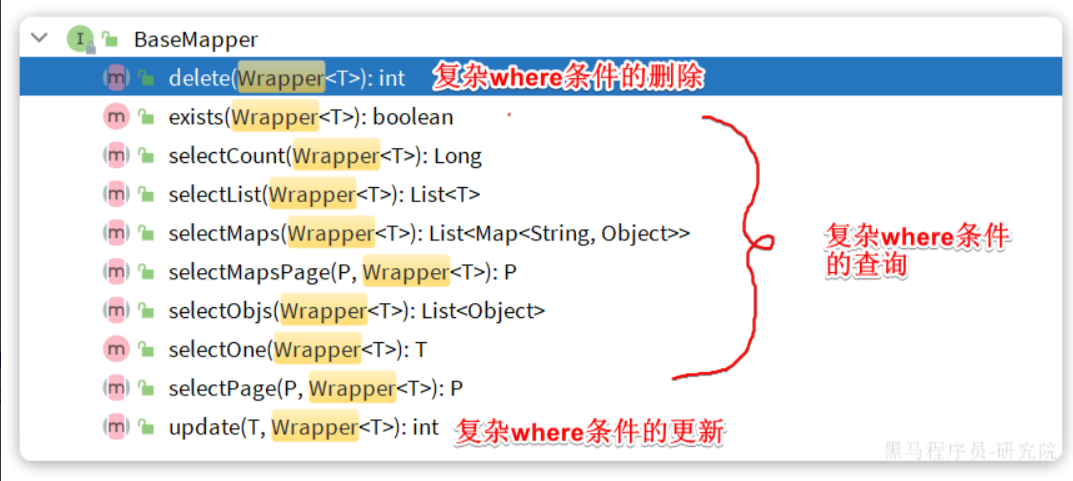
**2.1.**条件构造器 除了新增以外,修改、删除、查询的SQL语句都需要指定where条件。因此BaseMapper中提供的相关方法除了以id作为where条件以外,还支持更加复杂的where条件。
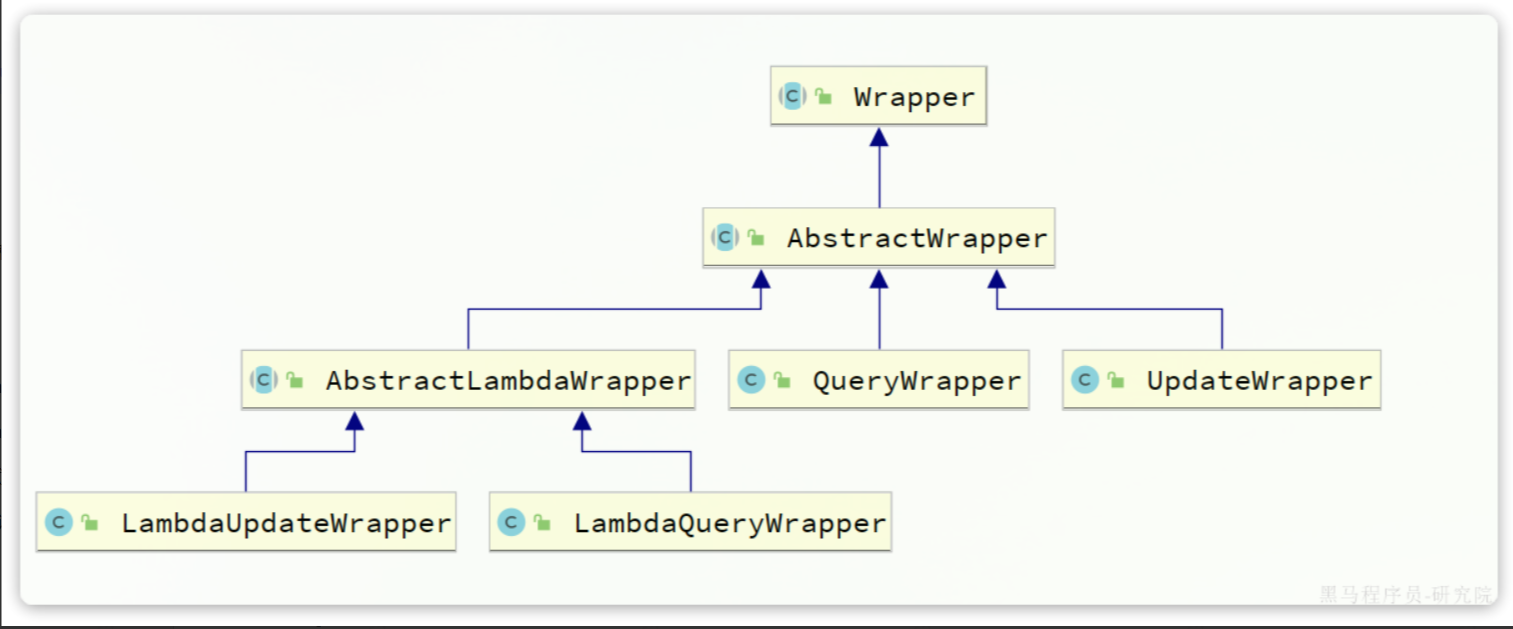
参数中的Wrapper就是条件构造的抽象类,其下有很多默认实现,继承关系如图:
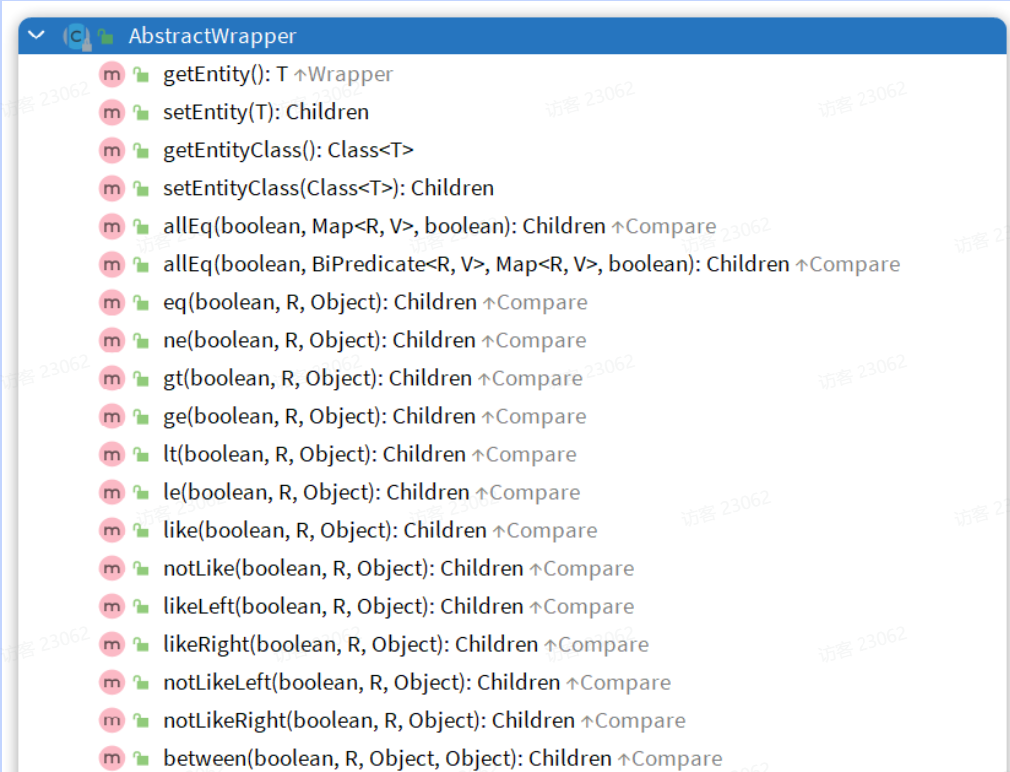
Wrapper的子类AbstractWrapper提供了where中包含的所有条件构造方法:
而QueryWrapper在AbstractWrapper的基础上拓展了一个select方法,允许指定查询字段:
而UpdateWrapper在AbstractWrapper的基础上拓展了一个set方法,允许指定SQL中的SET部分:
接下来,我们就来看看如何利用Wrapper实现复杂查询。
2.1.1.QueryWrapper 无论是修改、删除、查询,都可以使用QueryWrapper来构建查询条件。接下来看一些例子: 查询 :查询出名字中带o的,存款大于等于1000元的人。代码如下:
1
2
3
4
5
6
7
8
9
10
11
@Test void testQueryWrapper () { QueryWrapper<User> wrapper = new QueryWrapper <User>() .select("id" , "username" , "info" , "balance" ) .like("username" , "o" ) .ge("balance" , 1000 ); List<User> users = userMapper.selectList(wrapper); users.forEach(System.out::println); }
更新 :更新用户名为jack的用户的余额为2000,代码如下:
1
2
3
4
5
6
7
8
9
@Test void testUpdateByQueryWrapper () { QueryWrapper<User> wrapper = new QueryWrapper <User>().eq("username" , "Jack" ); User user = new User (); user.setBalance(2000 ); userMapper.update(user, wrapper); }
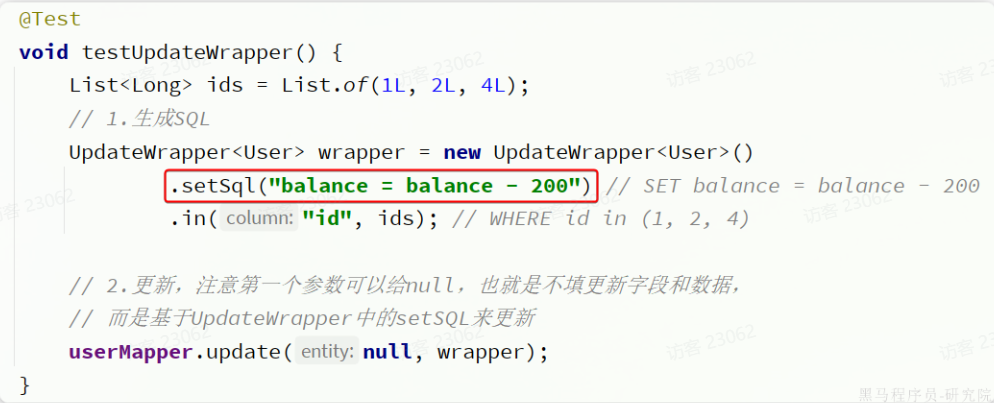
2.1.2.UpdateWrapper 基于BaseMapper中的update方法更新时只能直接赋值,对于一些复杂的需求就难以实现。 例如:更新id为1,2,4的用户的余额,扣200,对应的SQL应该是:
1 UPDATE user SET balance = balance - 200 WHERE id in (1 , 2 , 4 )
SET的赋值结果是基于字段现有值的,这个时候就要利用UpdateWrapper中的setSql功能了:
1
2
3
4
5
6
7
8
9
10
11
@Test void testUpdateWrapper () { List<Long> ids = List.of(1L , 2L , 4L ); UpdateWrapper<User> wrapper = new UpdateWrapper <User>() .setSql("balance = balance - 200" ) .in("id" , ids); userMapper.update(null , wrapper); }
**2.1.3.**LambdaQueryWrapper 无论是QueryWrapper还是UpdateWrapper在构造条件的时候都需要写死字段名称,会出现字符串魔法值。这在编程规范中显然是不推荐的。 那怎么样才能不写字段名,又能知道字段名呢?
其中一种办法是基于变量的gettter方法结合反射技术。因此我们只要将条件对应的字段的getter方法传递给MybatisPlus,它就能计算出对应的变量名了。而传递方法可以使用JDK8中的方法引用和Lambda表达式。 因此MybatisPlus又提供了一套基于Lambda的Wrapper,包含两个:
LambdaQueryWrapper
LambdaUpdateWrapper
分别对应QueryWrapper和UpdateWrapper
其使用方式如下:
1
2
3
4
5
6
7
8
9
10
11
12
@Test void testLambdaQueryWrapper () { QueryWrapper<User> wrapper = new QueryWrapper <>(); wrapper.lambda() .select(User::getId, User::getUsername, User::getInfo, User::getBalance) .like(User::getUsername, "o" ) .ge(User::getBalance, 1000 ); List<User> users = userMapper.selectList(wrapper); users.forEach(System.out::println); }
2.2****自定义SQL 在演示UpdateWrapper的案例中,我们在代码中编写了更新的SQL语句:
这种写法在某些企业也是不允许的,因为SQL语句最好都维护在持久层,而不是业务层。就当前案例来说,由于条件是in语句,只能将SQL写在Mapper.xml文件,利用foreach来生成动态SQL。 这实在是太麻烦了。假如查询条件更复杂,动态SQL的编写也会更加复杂。
所以,MybatisPlus提供了自定义SQL功能,可以让我们利用Wrapper生成查询条件,再结合Mapper.xml编写SQL
2.2.1.基本用法 以当前案例来说,我们可以这样写:
1
2
3
4
5
6
7
8
9
@Test void testCustomWrapper () { List<Long> ids = List.of(1L , 2L , 4L ); QueryWrapper<User> wrapper = new QueryWrapper <User>().in("id" , ids); userMapper.deductBalanceByIds(200 , wrapper); }
然后在UserMapper中自定义SQL:
1
2
3
4
5
6
7
8
9
10
11
12
package com.itheima.mp.mapper;import com.baomidou.mybatisplus.core.mapper.BaseMapper;import com.itheima.mp.domain.po.User;import org.apache.ibatis.annotations.Param;import org.apache.ibatis.annotations.Update;import org.apache.ibatis.annotations.Param;public interface UserMapper extends BaseMapper <User> { @Select("UPDATE user SET balance = balance - #{money} ${ew.customSqlSegment}") void deductBalanceByIds (@Param("money") int money, @Param("ew") QueryWrapper<User> wrapper) ; }
这样就省去了编写复杂查询条件的烦恼了。
2.2.2.多表关联 理论上来讲MyBatisPlus是不支持多表查询的,不过我们可以利用Wrapper中自定义条件结合自定义SQL来实现多表查询的效果。 例如,我们要查询出所有收货地址在北京的并且用户id在1、2、4之中的用户 要是自己基于mybatis实现SQL,大概是这样的:
1 2 3 4 5 6 7 8 9 10 <select id ="queryUserByIdAndAddr" resultType ="com.itheima.mp.domain.po.User" > SELECT * FROM user u INNER JOIN address a ON u.id = a.user_id WHERE u.id <foreach collection ="ids" separator ="," item ="id" open ="IN (" close =")" > #{id} </foreach > AND a.city = #{city} </select >
可以看出其中最复杂的就是WHERE条件的编写,如果业务复杂一些,这里的SQL会更变态。
但是基于自定义SQL结合Wrapper的玩法,我们就可以利用Wrapper来构建查询条件,然后手写SELECT及FROM部分,实现多表查询。
查询条件这样来构建:
1
2
3
4
5
6
7
8
9
10
11
12
@Test void testCustomJoinWrapper () { QueryWrapper<User> wrapper = new QueryWrapper <User>() .in("u.id" , List.of(1L , 2L , 4L )) .eq("a.city" , "北京" ); List<User> users = userMapper.queryUserByWrapper(wrapper); users.forEach(System.out::println); }
然后在UserMapper中自定义方法:
1
2
@Select("SELECT u.* FROM user u INNER JOIN address a ON u.id = a.user_id ${ew.customSqlSegment}") List<User> queryUserByWrapper (@Param("ew") QueryWrapper<User> wrapper) ;
当然,也可以在UserMapper.xml中写SQL:
1 2 3 <select id ="queryUserByIdAndAddr" resultType ="com.itheima.mp.domain.po.User" > SELECT * FROM user u INNER JOIN address a ON u.id = a.user_id ${ew.customSqlSegment} </select >
**2.3.**Service接口 MybatisPlus不仅提供了BaseMapper,还提供了通用的Service接口及默认实现,封装了一些常用的service模板方法。 通用接口为IService,默认实现为ServiceImpl,其中封装的方法可以分为以下几类:
save:新增remove:删除update:更新get:查询单个结果list:查询集合结果count:计数page:分页查询
**2.3.1.**CRUD 我们先俩看下基本的CRUD接口。 新增 :
save是新增单个元素saveBatch是批量新增saveOrUpdate是根据id判断,如果数据存在就更新,不存在则新增saveOrUpdateBatch是批量的新增或修改
删除:
removeById:根据id删除removeByIds:根据id批量删除removeByMap:根据Map中的键值对为条件删除remove(Wrapper<T>):根据Wrapper条件删除~~removeBatchByIds~~:暂不支持
修改:
updateById:根据id修改update(Wrapper<T>):根据UpdateWrapper修改,Wrapper中包含set和where部分update(T,Wrapper<T>):按照T内的数据修改与Wrapper匹配到的数据updateBatchById:根据id批量修改
Get:
getById:根据id查询1条数据getOne(Wrapper<T>):根据Wrapper查询1条数据getBaseMapper:获取Service内的BaseMapper实现,某些时候需要直接调用Mapper内的自定义SQL时可以用这个方法获取到Mapper
List:
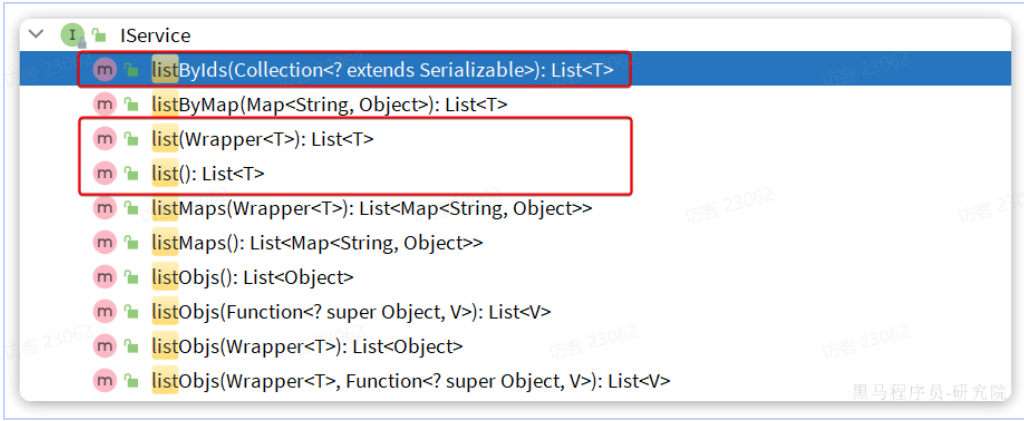
listByIds:根据id批量查询list(Wrapper<T>):根据Wrapper条件查询多条数据list():查询所有
Count :
count():统计所有数量count(Wrapper<T>):统计符合Wrapper条件的数据数量
getBaseMapper : 当我们在service中要调用Mapper中自定义SQL时,就必须获取service对应的Mapper,就可以通过这个方法:
2.3.2.基本用法 由于Service中经常需要定义与业务有关的自定义方法,因此我们不能直接使用IService,而是自定义Service接口,然后继承IService以拓展方法。同时,让自定义的Service实现类继承ServiceImpl,这样就不用自己实现IService中的接口了。
首先,定义IUserService,继承IService:
1
2
3
4
5
6
7
8
package com.itheima.mp.service;import com.baomidou.mybatisplus.extension.service.IService;import com.itheima.mp.domain.po.User;public interface IUserService extends IService <User> { }
然后,编写UserServiceImpl类,继承ServiceImpl,实现UserService:
1
2
3
4
5
6
7
8
9
10
11
12
package com.itheima.mp.service.impl;import com.baomidou.mybatisplus.extension.service.impl.ServiceImpl;import com.itheima.mp.domain.po.User;import com.itheima.mp.domain.po.service.IUserService;import com.itheima.mp.mapper.UserMapper;import org.springframework.stereotype.Service;@Service public class UserServiceImpl extends ServiceImpl <UserMapper, User> implements IUserService { }
接下来,我们快速实现下面4个接口:
编号 接口 请求方式 请求路径 请求参数 返回值
1
新增用户
POST
/users
用户表单实体
无
2
删除用户
DELETE
/users/{id}
用户id
无
3
根据id查询用户
GET
/users/{id}
用户id
用户VO
4
根据id批量查询
GET
/users
用户id集合
用户VO集合
首先,我们在项目中引入几个依赖:
1 2 3 4 5 6 7 8 9 10 11 <dependency > <groupId > com.github.xiaoymin</groupId > <artifactId > knife4j-openapi2-spring-boot-starter</artifactId > <version > 4.1.0</version > </dependency > <dependency > <groupId > org.springframework.boot</groupId > <artifactId > spring-boot-starter-web</artifactId > </dependency >
然后需要配置swagger信息:
1
2
3
4
5
6
7
8
9
10
11
12
13
14
15
knife4j: enable: true openapi: title: 用户管理接口文档 description: "用户管理接口文档" email: zhanghuyi@itcast.cn concat: 虎哥 url: https://www.itcast.cn version: v1.0.0 group: default: group-name: default api-rule: package api-rule-resources: - com.itheima.mp.controller
然后,接口需要两个实体:
UserFormDTO:代表新增时的用户表单
UserVO:代表查询的返回结果
首先是UserFormDTO:
1
2
3
4
5
6
7
8
9
10
11
12
13
14
15
16
17
18
19
20
21
22
23
24
25
26
27
28
29
30
package com.itheima.mp.domain.dto;import com.baomidou.mybatisplus.annotation.TableField;import com.baomidou.mybatisplus.extension.handlers.JacksonTypeHandler;import io.swagger.annotations.ApiModel;import io.swagger.annotations.ApiModelProperty;import lombok.Data;@Data @ApiModel(description = "用户表单实体") public class UserFormDTO { @ApiModelProperty("id") private Long id; @ApiModelProperty("用户名") private String username; @ApiModelProperty("密码") private String password; @ApiModelProperty("注册手机号") private String phone; @ApiModelProperty("详细信息,JSON风格") private String info; @ApiModelProperty("账户余额") private Integer balance; }
然后是UserVO:
1
2
3
4
5
6
7
8
9
10
11
12
13
14
15
16
17
18
19
20
21
22
23
24
25
package com.itheima.mp.domain.vo;import io.swagger.annotations.ApiModel;import io.swagger.annotations.ApiModelProperty;import lombok.Data;@Data @ApiModel(description = "用户VO实体") public class UserVO { @ApiModelProperty("用户id") private Long id; @ApiModelProperty("用户名") private String username; @ApiModelProperty("详细信息") private String info; @ApiModelProperty("使用状态(1正常 2冻结)") private Integer status; @ApiModelProperty("账户余额") private Integer balance; }
最后,按照Restful风格编写Controller接口方法:
1
2
3
4
5
6
7
8
9
10
11
12
13
14
15
16
17
18
19
20
21
22
23
24
25
26
27
28
29
30
31
32
33
34
35
36
37
38
39
40
41
42
43
44
45
46
47
48
49
50
51
52
53
54
55
package com.itheima.mp.controller;import cn.hutool.core.bean.BeanUtil;import com.itheima.mp.domain.dto.UserFormDTO;import com.itheima.mp.domain.po.User;import com.itheima.mp.domain.vo.UserVO;import com.itheima.mp.service.IUserService;import io.swagger.annotations.Api;import io.swagger.annotations.ApiOperation;import lombok.RequiredArgsConstructor;import org.springframework.web.bind.annotation.*;import java.util.List;@Api(tags = "用户管理接口") @RequiredArgsConstructor @RestController @RequestMapping("users") public class UserController { private final IUserService userService; @PostMapping @ApiOperation("新增用户") public void saveUser (@RequestBody UserFormDTO userFormDTO) { User user = BeanUtil.copyProperties(userFormDTO, User.class); userService.save(user); } @DeleteMapping("/{id}") @ApiOperation("删除用户") public void removeUserById (@PathVariable("id") Long userId) { userService.removeById(userId); } @GetMapping("/{id}") @ApiOperation("根据id查询用户") public UserVO queryUserById (@PathVariable("id") Long userId) { User user = userService.getById(userId); return BeanUtil.copyProperties(user, UserVO.class); } @GetMapping @ApiOperation("根据id集合查询用户") public List<UserVO> queryUserByIds (@RequestParam("ids") List<Long> ids) { List<User> users = userService.listByIds(ids); return BeanUtil.copyToList(users, UserVO.class); } }
可以看到上述接口都直接在controller即可实现,无需编写任何service代码,非常方便。
不过,一些带有业务逻辑的接口则需要在service中自定义实现了。例如下面的需求:
这看起来是个简单修改功能,只要修改用户余额即可。但这个业务包含一些业务逻辑处理:
这些业务逻辑都要在service层来做,另外更新余额需要自定义SQL,要在mapper中来实现。因此,我们除了要编写controller以外,具体的业务还要在service和mapper中编写。
首先在UserController中定义一个方法:
1
2
3
4
5
@PutMapping("{id}/deduction/{money}") @ApiOperation("扣减用户余额") public void deductBalance (@PathVariable("id") Long id, @PathVariable("money") Integer money) { userService.deductBalance(id, money); }
然后是UserService接口:
1
2
3
4
5
6
7
8
package com.itheima.mp.service;import com.baomidou.mybatisplus.extension.service.IService;import com.itheima.mp.domain.po.User;public interface IUserService extends IService <User> { void deductBalance (Long id, Integer money) ; }
最后是UserServiceImpl实现类:
1
2
3
4
5
6
7
8
9
10
11
12
13
14
15
16
17
18
19
20
21
22
23
24
25
26
package com.itheima.mp.service.impl;import com.baomidou.mybatisplus.extension.service.impl.ServiceImpl;import com.itheima.mp.domain.po.User;import com.itheima.mp.mapper.UserMapper;import com.itheima.mp.service.IUserService;import org.springframework.stereotype.Service;@Service public class UserServiceImpl extends ServiceImpl <UserMapper, User> implements IUserService { @Override public void deductBalance (Long id, Integer money) { User user = getById(id); if (user == null || user.getStatus() == 2 ) { throw new RuntimeException ("用户状态异常" ); } if (user.getBalance() < money) { throw new RuntimeException ("用户余额不足" ); } baseMapper.deductMoneyById(id, money); } }
最后是mapper:
1
2
@Update("UPDATE user SET balance = balance - #{money} WHERE id = #{id}") void deductMoneyById (@Param("id") Long id, @Param("money") Integer money) ;
**2.3.3.**Lambda IService中还提供了Lambda功能来简化我们的复杂查询及更新功能。我们通过两个案例来学习一下。
案例一:实现一个根据复杂条件查询用户的接口,查询条件如下:
name:用户名关键字,可以为空
status:用户状态,可以为空
minBalance:最小余额,可以为空
maxBalance:最大余额,可以为空
可以理解成一个用户的后台管理界面,管理员可以自己选择条件来筛选用户,因此上述条件不一定存在,需要做判断。
我们首先需要定义一个查询条件实体,UserQuery实体:
1
2
3
4
5
6
7
8
9
10
11
12
13
14
15
16
17
18
package com.itheima.mp.domain.query;import io.swagger.annotations.ApiModel;import io.swagger.annotations.ApiModelProperty;import lombok.Data;@Data @ApiModel(description = "用户查询条件实体") public class UserQuery { @ApiModelProperty("用户名关键字") private String name; @ApiModelProperty("用户状态:1-正常,2-冻结") private Integer status; @ApiModelProperty("余额最小值") private Integer minBalance; @ApiModelProperty("余额最大值") private Integer maxBalance; }
接下来我们在UserController中定义一个controller方法:
1
2
3
4
5
6
7
8
9
10
11
12
13
14
15
16
17
18
@GetMapping("/list") @ApiOperation("根据id集合查询用户") public List<UserVO> queryUsers (UserQuery query) { String username = query.getName(); Integer status = query.getStatus(); Integer minBalance = query.getMinBalance(); Integer maxBalance = query.getMaxBalance(); LambdaQueryWrapper<User> wrapper = new QueryWrapper <User>().lambda() .like(username != null , User::getUsername, username) .eq(status != null , User::getStatus, status) .ge(minBalance != null , User::getBalance, minBalance) .le(maxBalance != null , User::getBalance, maxBalance); List<User> users = userService.list(wrapper); return BeanUtil.copyToList(users, UserVO.class); }
在组织查询条件的时候,我们加入了 username != null 这样的参数,意思就是当条件成立时才会添加这个查询条件,类似Mybatis的mapper.xml文件中的<if>标签。这样就实现了动态查询条件效果了。
不过,上述条件构建的代码太麻烦了。 因此Service中对LambdaQueryWrapper和LambdaUpdateWrapper的用法进一步做了简化。我们无需自己通过new的方式来创建Wrapper,而是直接调用lambdaQuery和lambdaUpdate方法:
基于Lambda查询:
1
2
3
4
5
6
7
8
9
10
11
12
13
14
15
16
17
18
@GetMapping("/list") @ApiOperation("根据id集合查询用户") public List<UserVO> queryUsers (UserQuery query) { String username = query.getName(); Integer status = query.getStatus(); Integer minBalance = query.getMinBalance(); Integer maxBalance = query.getMaxBalance(); List<User> users = userService.lambdaQuery() .like(username != null , User::getUsername, username) .eq(status != null , User::getStatus, status) .ge(minBalance != null , User::getBalance, minBalance) .le(maxBalance != null , User::getBalance, maxBalance) .list(); return BeanUtil.copyToList(users, UserVO.class); }
可以发现lambdaQuery方法中除了可以构建条件,还需要在链式编程的最后添加一个list(),这是在告诉MP我们的调用结果需要是一个list集合。这里不仅可以用list(),可选的方法有:
.one():最多1个结果.list():返回集合结果.count():返回计数结果
MybatisPlus会根据链式编程的最后一个方法来判断最终的返回结果。
与lambdaQuery方法类似,IService中的lambdaUpdate方法可以非常方便的实现复杂更新业务。
例如下面的需求:
需求:改造根据id修改用户余额的接口,要求如下
如果扣减后余额为0,则将用户status修改为冻结状态(2)
也就是说我们在扣减用户余额时,需要对用户剩余余额做出判断,如果发现剩余余额为0,则应该将status修改为2,这就是说update语句的set部分是动态的。
实现如下:
1
2
3
4
5
6
7
8
9
10
11
12
13
14
15
16
17
18
19
20
21
22
@Override @Transactional public void deductBalance (Long id, Integer money) { User user = getById(id); if (user == null || user.getStatus() == 2 ) { throw new RuntimeException ("用户状态异常!" ); } if (user.getBalance() < money) { throw new RuntimeException ("用户余额不足!" ); } int remainBalance = user.getBalance() - money; lambdaUpdate() .set(User::getBalance, remainBalance) .set(remainBalance == 0 , User::getStatus, 2 ) .eq(User::getId, id) .eq(User::getBalance, user.getBalance()) .update(); }
**2.3.4.**批量新增 IService中的批量新增功能使用起来非常方便,但有一点注意事项,我们先来测试一下。 首先我们测试逐条插入数据:
1
2
3
4
5
6
7
8
9
10
11
12
13
14
15
16
17
18
19
20
21
@Test void testSaveOneByOne () { long b = System.currentTimeMillis(); for (int i = 1 ; i <= 100000 ; i++) { userService.save(buildUser(i)); } long e = System.currentTimeMillis(); System.out.println("耗时:" + (e - b)); } private User buildUser (int i) { User user = new User (); user.setUsername("user_" + i); user.setPassword("123" ); user.setPhone("" + (18688190000L + i)); user.setBalance(2000 ); user.setInfo("{\"age\": 24, \"intro\": \"英文老师\", \"gender\": \"female\"}" ); user.setCreateTime(LocalDateTime.now()); user.setUpdateTime(user.getCreateTime()); return user; }
执行结果如下:
可以看到速度非常慢。
然后再试试MybatisPlus的批处理:
1
2
3
4
5
6
7
8
9
10
11
12
13
14
15
16
@Test void testSaveBatch () { List<User> list = new ArrayList <>(1000 ); long b = System.currentTimeMillis(); for (int i = 1 ; i <= 100000 ; i++) { list.add(buildUser(i)); if (i % 1000 == 0 ) { userService.saveBatch(list); list.clear(); } } long e = System.currentTimeMillis(); System.out.println("耗时:" + (e - b)); }
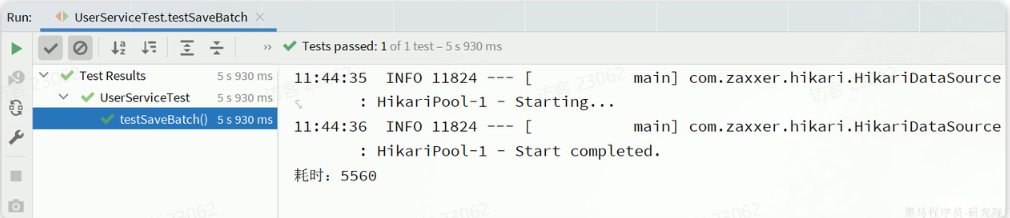
执行最终耗时如下:
可以看到使用了批处理以后,比逐条新增效率提高了10倍左右,性能还是不错的。
不过,我们简单查看一下MybatisPlus源码:
1
2
3
4
5
6
7
8
9
10
11
12
13
14
15
16
17
18
19
20
21
22
23
@Transactional(rollbackFor = Exception.class) @Override public boolean saveBatch (Collection<T> entityList, int batchSize) { String sqlStatement = getSqlStatement(SqlMethod.INSERT_ONE); return executeBatch(entityList, batchSize, (sqlSession, entity) -> sqlSession.insert(sqlStatement, entity)); } public static <E> boolean executeBatch (Class<?> entityClass, Log log, Collection<E> list, int batchSize, BiConsumer<SqlSession, E> consumer) { Assert.isFalse(batchSize < 1 , "batchSize must not be less than one" ); return !CollectionUtils.isEmpty(list) && executeBatch(entityClass, log, sqlSession -> { int size = list.size(); int idxLimit = Math.min(batchSize, size); int i = 1 ; for (E element : list) { consumer.accept(sqlSession, element); if (i == idxLimit) { sqlSession.flushStatements(); idxLimit = Math.min(idxLimit + batchSize, size); } i++; } }); }
可以发现其实MybatisPlus的批处理是基于PrepareStatement的预编译模式,然后批量提交,最终在数据库执行时还是会有多条insert语句,逐条插入数据。SQL类似这样:
1
2
3
4
Preparing: INSERT INTO user ( username, password, phone, info, balance, create_time, update_time ) VALUES ( ?, ?, ?, ?, ?, ?, ? ) Parameters: user_1, 123 , 18688190001 , "", 2000 , 2023 -07 -01 , 2023 -07 -01 Parameters: user_2, 123 , 18688190002 , "", 2000 , 2023 -07 -01 , 2023 -07 -01 Parameters: user_3, 123 , 18688190003 , "", 2000 , 2023 -07 -01 , 2023 -07 -01
而如果想要得到最佳性能,最好是将多条SQL合并为一条,像这样:
1
2
3
4
5
6
INSERT INTO user ( username, password, phone, info, balance, create_time, update_time )VALUES (user_1, 123 , 18688190001 , "", 2000 , 2023 -07 -01 , 2023 -07 -01 ), (user_2, 123 , 18688190002 , "", 2000 , 2023 -07 -01 , 2023 -07 -01 ), (user_3, 123 , 18688190003 , "", 2000 , 2023 -07 -01 , 2023 -07 -01 ), (user_4, 123 , 18688190004 , "", 2000 , 2023 -07 -01 , 2023 -07 -01 );
该怎么做呢?
MySQL的客户端连接参数中有这样的一个参数:rewriteBatchedStatements。顾名思义,就是重写批处理的statement语句。参考文档:
https://dev.mysql.com/doc/connector-j/8.0/en/connector-j-connp-props-performance-extensions.html#cj-conn-prop_rewriteBatchedStatements
这个参数的默认值是false,我们需要修改连接参数,将其配置为true
修改项目中的application.yml文件,在jdbc的url后面添加参数&rewriteBatchedStatements=true:
1
2
3
4
5
6
spring: datasource: url: jdbc:mysql://127.0.0.1:3306/mp?useUnicode=true&characterEncoding=UTF-8&autoReconnect=true&serverTimezone=Asia/Shanghai&rewriteBatchedStatements=true driver-class-name: com.mysql.cj.jdbc.Driver username: root password: MySQL123
再次测试插入10万条数据,可以发现速度有非常明显的提升:
在ClientPreparedStatement的executeBatchInternal中,有判断rewriteBatchedStatements值是否为true并重写SQL的功能:
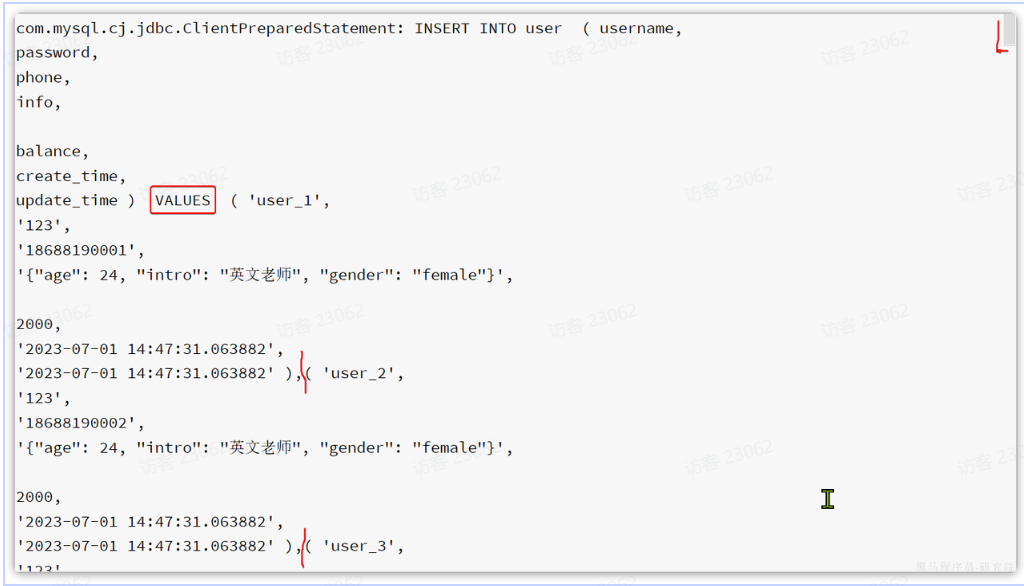
最终,SQL被重写了: