AI Services 到目前为止,我们一直在介绍底层组件,如 ChatLanguageModel、ChatMessage、ChatMemory 等。 在这个层面上工作非常灵活,给予您完全的自由,但也迫使您编写大量的样板代码。 由于 LLM 驱动的应用程序通常不仅需要单个组件,还需要多个组件协同工作 (例如,提示模板、聊天记忆、LLM、输出解析器、RAG 组件:嵌入模型和存储) 并且经常涉及多次交互,协调所有这些组件变得更加繁琐。
我们希望您专注于业务逻辑,而不是低级实现细节。 因此,LangChain4j 中目前有两个高级概念可以帮助您:AI 服务和链。
Chains (legacy) 链的概念源自 Python 的 LangChain(在引入 LCEL 之前)。 其思想是为每个常见用例(如聊天机器人、RAG 等)提供一个 Chain。 链组合多个低级组件并协调它们之间的交互。 它们的主要问题是,如果您需要自定义某些内容,它们过于僵化。 LangChain4j 只实现了两个链(ConversationalChain 和 ConversationalRetrievalChain), 目前我们不打算添加更多。
AI Services 我们提出了另一种为 Java 量身定制的解决方案,称为 AI 服务。 其思想是将与 LLM 和其他组件交互的复杂性隐藏在简单的 API 后面。
这种方法与 Spring Data JPA 或 Retrofit 非常相似:您以声明方式定义具有所需 API 的接口, 然后 LangChain4j 提供实现该接口的对象(代理)。 您可以将 AI 服务视为应用程序服务层中的组件。 它提供 AI 服务。因此得名。
AI 服务处理最常见的操作:
它们还支持更高级的功能:
AI 服务可用于构建有状态的聊天机器人,促进来回交互, 也可用于自动化每次调用 LLM 都是独立的流程。
让我们看一下最简单的 AI 服务。之后,我们将探索更复杂的示例。
最简单的 AI 服务 首先,我们定义一个带有单个方法 chat 的接口,该方法接受 String 作为输入并返回 String。
1
2
3
4
interface Assistant { String chat (String userMessage) ; }
然后,我们创建低级组件。这些组件将在我们的 AI 服务底层使用。 在这种情况下,我们只需要 ChatLanguageModel:
1
2
3
4
ChatLanguageModel model = OpenAiChatModel.builder() .apiKey(System.getenv("OPENAI_API_KEY" )) .modelName(GPT_4_O_MINI) .build();
最后,我们可以使用 AiServices 类创建我们的 AI 服务实例:
1 Assistant assistant = AiServices.create(Assistant.class, model);
备注
在 Spring Boot 应用程序中, 自动配置会处理创建 Assistant bean。 这意味着您不需要调用 AiServices.create(...),只需在需要的地方注入/自动装配 Assistant 即可。
现在我们可以使用 Assistant:
1
2
String answer = assistant.chat("Hello" );System.out.println(answer);
案例:使用高阶API 1 2 3 4 5 6 7 8 9 10 11 12 13 14 15 16 17 18 19 20 21 22 23 24 public interface Assistant { String chat (String userMessage) ; } @Bean public Assistant assistant () { OpenAiChatModel model = OpenAiChatModel.builder() .baseUrl(baseUrl) .apiKey(apiKey) .modelName(modelName) .build(); Assistant assistant = AiServices.create(Assistant.class, model); return assistant; } @Autowired private Assistant assistant; @GetMapping("/chat/{question}") public String chat (@PathVariable("question") String question) { String resp = assistant.chat(question); log.info("LLM resp:[{}]" , resp); return resp; }
它是如何工作的? 您将接口的 Class 与低级组件一起提供给 AiServices, 然后 AiServices 创建一个实现该接口的代理对象。 目前,它使用反射,但我们也在考虑其他替代方案。 这个代理对象处理所有输入和输出的转换。 在这种情况下,输入是单个 String,但我们使用的是 ChatLanguageModel,它接受 ChatMessage 作为输入。 因此,AiService 会自动将其转换为 UserMessage 并调用 ChatLanguageModel。 由于 chat 方法的输出类型是 String,在 ChatLanguageModel 返回 AiMessage 后, 它将在从 chat 方法返回之前转换为 String。
@SystemMessage 现在,让我们看一个更复杂的例子。 我们将强制 LLM 使用俚语回复 😉
这通常通过在 SystemMessage 中提供指令来实现。
1 2 3 4 5 6 7 8 9 10 11 public interface Assistant { @SystemMessage("You are a good friend of mine. Answer using slang.") String chat (String userMessage) ; } @GetMapping("/chat/{question}") public String chat (@PathVariable("question") String question) { String resp = assistant.chat(question); return resp; }
在这个例子中,我们添加了 @SystemMessage 注解,其中包含我们想要使用的系统提示模板。 这将在幕后转换为 SystemMessage 并与 UserMessage 一起发送给 LLM。
系统消息提供者 1 2 3 4 5 Assistant assistant = AiServices.builder(Assistant.class) .chatLanguageModel(model) .systemMessageProvider(memoryId -> "You are a good friend of mine. Answer using slang." ) .build(); return assistant;
如您所见,您可以根据聊天记忆 ID(用户或对话)提供不同的系统消息。
@UserMessage 现在,假设我们使用的模型不支持系统消息, 或者我们只想为此目的使用 UserMessage。
1 2 3 4 5 6 7 public interface Assistant { @UserMessage("You are a good friend of mine. Answer using slang. {{it}}") String chat (String userMessage) ; } String resp = assistant.chat(question);
我们将 @SystemMessage 注解替换为 @UserMessage, 并指定了一个包含变量 it 的提示模板,该变量指的是唯一的方法参数。
也可以用 @V 注解 String userMessage, 并为提示模板变量分配自定义名称:
1 2 3 4 5 interface Friend { @UserMessage("You are a good friend of mine. Answer using slang. {{message}}") String chat (@V("message") String userMessage) ; }
备注
请注意,在使用 Spring Boot 的 LangChain4j 时,不需要使用 @V。 只有在 Java 编译期间未 启用 -parameters 选项时,才需要此注解。
有效的 AI 服务方法示例 以下是一些有效的 AI 服务方法示例。
1 2 3 4 5 6 7 8 9 10 11 12 13 14 15 16 17 18 19 20 String chat (String userMessage) ; String chat (@UserMessage String userMessage) ; String chat (@UserMessage String userMessage, @V("country") String country) ; @UserMessage("What is the capital of Germany?") String chat () ; @UserMessage("What is the capital of {{it}}?") String chat (String country) ; @UserMessage("What is the capital of {{country}}?") String chat (@V("country") String country) ; @UserMessage("What is the {{something}} of {{country}}?") String chat (@V("something") String something, @V("country") String country) ; @UserMessage("What is the capital of {{country}}?") String chat (String country) ;
1 2 3 4 5 6 7 8 9 10 11 12 13 14 15 16 17 18 19 20 21 22 23 24 25 26 27 28 29 30 31 32 33 34 @SystemMessage("Given a name of a country, answer with a name of it's capital") String chat (String userMessage) ; @SystemMessage("Given a name of a country, answer with a name of it's capital") String chat (@UserMessage String userMessage) ; @SystemMessage("Given a name of a country, {{answerInstructions}}") String chat (@V("answerInstructions") String answerInstructions, @UserMessage String userMessage) ; @SystemMessage("Given a name of a country, answer with a name of it's capital") String chat (@UserMessage String userMessage, @V("country") String country) ; @SystemMessage("Given a name of a country, {{answerInstructions}}") String chat (@V("answerInstructions") String answerInstructions, @UserMessage String userMessage, @V("country") String country) ; @SystemMessage("Given a name of a country, answer with a name of it's capital") @UserMessage("Germany") String chat () ; @SystemMessage("Given a name of a country, {{answerInstructions}}") @UserMessage("Germany") String chat (@V("answerInstructions") String answerInstructions) ; @SystemMessage("Given a name of a country, answer with a name of it's capital") @UserMessage("{{it}}") String chat (String country) ; @SystemMessage("Given a name of a country, answer with a name of it's capital") @UserMessage("{{country}}") String chat (@V("country") String country) ; @SystemMessage("Given a name of a country, {{answerInstructions}}") @UserMessage("{{country}}") String chat (@V("answerInstructions") String answerInstructions, @V("country") String country) ;
返回类型 AI 服务方法可以返回以下类型之一:
String - 在这种情况下,LLM 生成的输出将不经任何处理/解析直接返回结构化输出 支持的任何类型 - 在这种情况下, AI 服务将在返回之前将 LLM 生成的输出解析为所需类型
任何类型都可以额外包装在 Result<T> 中,以获取有关 AI 服务调用的额外元数据:
TokenUsage - AI 服务调用期间使用的令牌总数。如果 AI 服务对 LLM 进行了多次调用 (例如,因为执行了工具),它将汇总所有调用的令牌使用情况。Sources - 在 RAG 检索期间检索到的 Content
已执行的工具
FinishReason
示例:
1 2 3 4 5 6 7 8 9 10 11 12 interface Assistant { @UserMessage("Generate an outline for the article on the following topic: {{it}}") Result<List<String>> generateOutlineFor (String topic) ; } Result<List<String>> result = assistant.generateOutlineFor("Java" ); List<String> outline = result.content(); TokenUsage tokenUsage = result.tokenUsage();List<Content> sources = result.sources(); List<ToolExecution> toolExecutions = result.toolExecutions(); FinishReason finishReason = result.finishReason();
结构化输出 如果您想从 LLM 接收结构化输出(例如,复杂的 Java 对象,而不是 String 中的非结构化文本), 您可以将 AI 服务方法的返回类型从 String 更改为其他类型。
有关结构化输出的更多信息可以在这里 找到。
返回类型为 boolean 1 2 3 4 5 6 7 8 9 10 interface SentimentAnalyzer { @UserMessage("Does {{it}} has a positive sentiment?") boolean isPositive (String text) ; } SentimentAnalyzer sentimentAnalyzer = AiServices.create(SentimentAnalyzer.class, model);boolean positive = sentimentAnalyzer.isPositive("It's wonderful!" );
返回类型为 Enum 1 2 3 4 5 6 7 8 9 10 11 12 13 enum Priority { CRITICAL, HIGH, LOW } interface PriorityAnalyzer { @UserMessage("Analyze the priority of the following issue: {{it}}") Priority analyzePriority (String issueDescription) ; } PriorityAnalyzer priorityAnalyzer = AiServices.create(PriorityAnalyzer.class, model);Priority priority = priorityAnalyzer.analyzePriority("The main payment gateway is down, and customers cannot process transactions." );
返回类型为 POJO 1 2 3 4 5 6 7 8 9 10 11 12 13 14 15 16 17 18 19 20 21 22 23 24 25 26 27 28 29 30 31 32 33 34 class Person { @Description("first name of a person") String firstName; String lastName; LocalDate birthDate; Address address; } @Description("an address") class Address { String street; Integer streetNumber; String city; } interface PersonExtractor { @UserMessage("Extract information about a person from {{it}}") Person extractPersonFrom (String text) ; } PersonExtractor personExtractor = AiServices.create(PersonExtractor.class, model);String text = """ In 1968, amidst the fading echoes of Independence Day, a child named John arrived under the calm evening sky. This newborn, bearing the surname Doe, marked the start of a new journey. He was welcomed into the world at 345 Whispering Pines Avenue a quaint street nestled in the heart of Springfield an abode that echoed with the gentle hum of suburban dreams and aspirations. """ ;Person person = personExtractor.extractPersonFrom(text);System.out.println(person);
流式处理 AI 服务可以使用 TokenStream 返回类型逐个令牌流式处理响应 :
1 2 3 4 5 6 7 8 9 10 11 12 13 14 15 16 17 18 19 20 interface Assistant { TokenStream chat (String message) ; } StreamingChatLanguageModel model = OpenAiStreamingChatModel.builder() .apiKey(System.getenv("OPENAI_API_KEY" )) .modelName(GPT_4_O_MINI) .build(); Assistant assistant = AiServices.create(Assistant.class, model);TokenStream tokenStream = assistant.chat("Tell me a joke" );tokenStream.onPartialResponse((String partialResponse) -> System.out.println(partialResponse)) .onRetrieved((List<Content> contents) -> System.out.println(contents)) .onToolExecuted((ToolExecution toolExecution) -> System.out.println(toolExecution)) .onCompleteResponse((ChatResponse response) -> System.out.println(response)) .onError((Throwable error) -> error.printStackTrace()) .start();
Flux 您也可以使用 Flux<String> 代替 TokenStream。 为此,请导入 langchain4j-reactor 模块:
1 2 3 4 5 <dependency > <groupId > dev.langchain4j</groupId > <artifactId > langchain4j-reactor</artifactId > <version > 1.0.0-beta3</version > </dependency >
案例:高阶API + Flux 实现流式输出 1 2 3 4 5 6 7 8 9 10 11 12 13 14 15 16 17 18 19 20 21 22 23 24 25 26 public interface StreamingAssistant { TokenStream chatStream (String message) ; } @Bean public StreamingAssistant streamingAssistant () { OpenAiStreamingChatModel model = OpenAiStreamingChatModel.builder() .baseUrl(baseUrl) .apiKey(apiKey) .modelName(modelName) .build(); StreamingAssistant streamingAssistant = AiServices.create(StreamingAssistant.class, model); return streamingAssistant; } @GetMapping(value = "/stream/chat/{question}", produces = "text/plain;charset=UTF-8") public Flux<String> chatStream (@PathVariable("question") String question) { TokenStream tokenStream = streamingAssistant.chatStream(question); return Flux.create(emitter -> { tokenStream.onPartialResponse(token -> emitter.next(token)) .onCompleteResponse(resp -> emitter.complete()) .onError(emitter::error) .start(); }, FluxSink.OverflowStrategy.BUFFER); }
聊天记忆 AI 服务可以使用聊天记忆 来”记住”之前的交互:
1 2 3 4 Assistant assistant = AiServices.builder(Assistant.class) .chatLanguageModel(model) .chatMemory(MessageWindowChatMemory.withMaxMessages(10 )) .build();
在这种情况下,所有 AI 服务调用都将使用相同的 ChatMemory 实例。 然而,如果您有多个用户,这种方法将不起作用, 因为每个用户都需要自己的 ChatMemory 实例来维护各自的对话。
解决这个问题的方法是使用 ChatMemoryProvider:
1 2 3 4 5 6 7 8 9 10 11 interface Assistant { String chat (@MemoryId int memoryId, @UserMessage String message) ; } Assistant assistant = AiServices.builder(Assistant.class) .chatLanguageModel(model) .chatMemoryProvider(memoryId -> MessageWindowChatMemory.withMaxMessages(10 )) .build(); String answerToKlaus = assistant.chat(1 , "Hello, my name is Klaus" );String answerToFrancine = assistant.chat(2 , "Hello, my name is Francine" );
在这种情况下,ChatMemoryProvider 将提供两个不同的 ChatMemory 实例,每个记忆 ID 一个。
以这种方式使用 ChatMemory 时,重要的是要清除不再需要的对话记忆,以避免内存泄漏。要使 AI 服务内部使用的聊天记忆可访问,只需让定义它的接口扩展 ChatMemoryAccess 接口即可。
1 2 3 interface Assistant extends ChatMemoryAccess { String chat (@MemoryId int memoryId, @UserMessage String message) ; }
这使得可以访问单个对话的 ChatMemory 实例,并在对话终止时删除它。
1 2 3 4 5 String answerToKlaus = assistant.chat(1 , "Hello, my name is Klaus" );String answerToFrancine = assistant.chat(2 , "Hello, my name is Francine" );List<ChatMessage> messagesWithKlaus = assistant.getChatMemory(1 ).messages(); boolean chatMemoryWithFrancineEvicted = assistant.evictChatMemory(2 );
备注
请注意,如果 AI 服务方法没有用 @MemoryId 注解的参数, ChatMemoryProvider 中 memoryId 的值将默认为字符串 "default"。
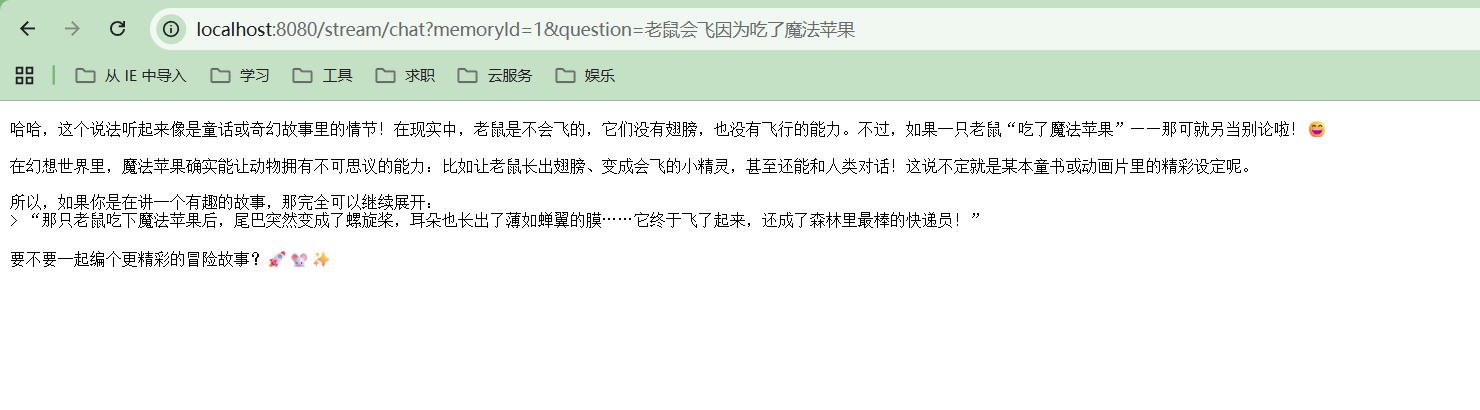
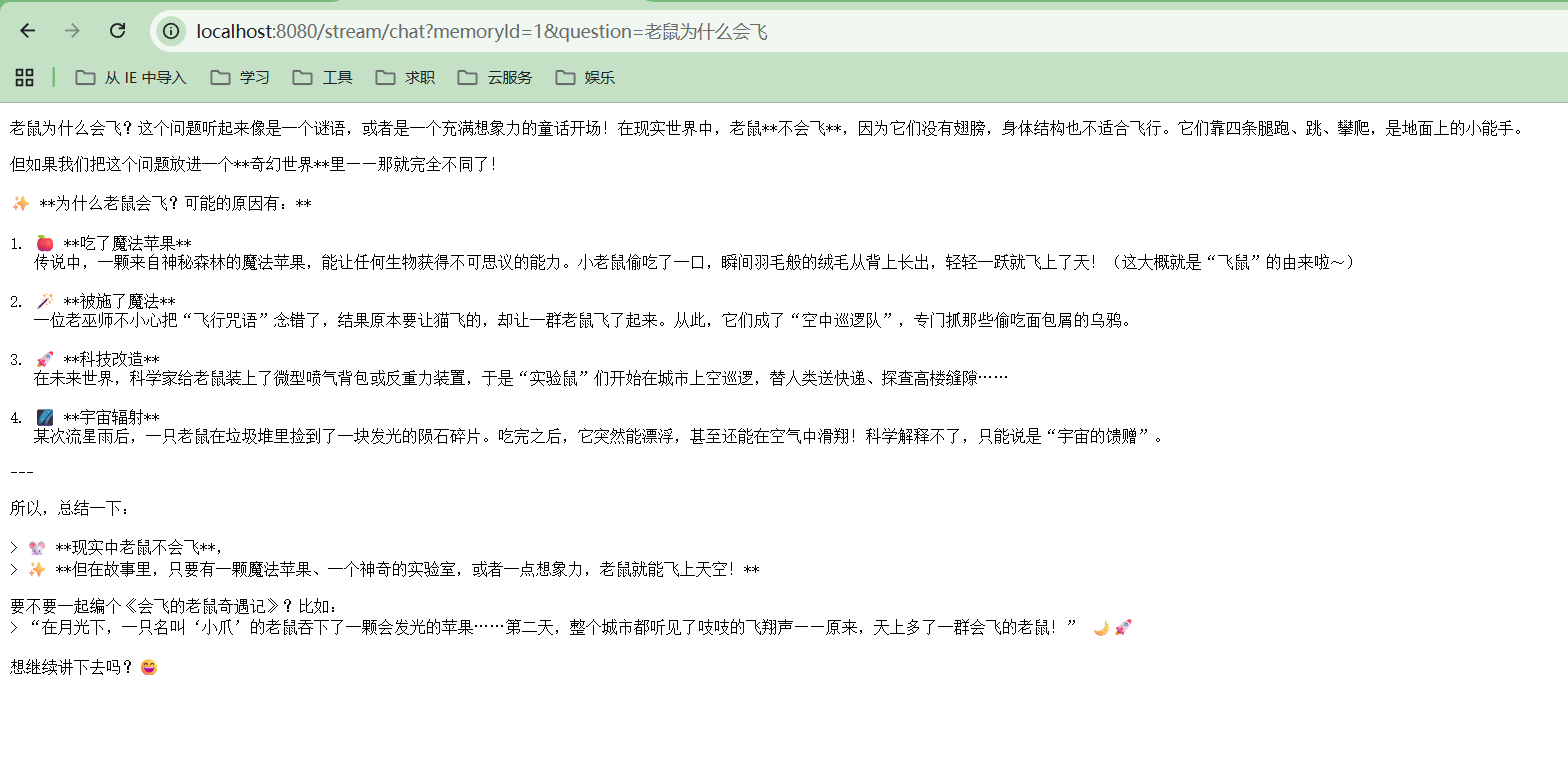
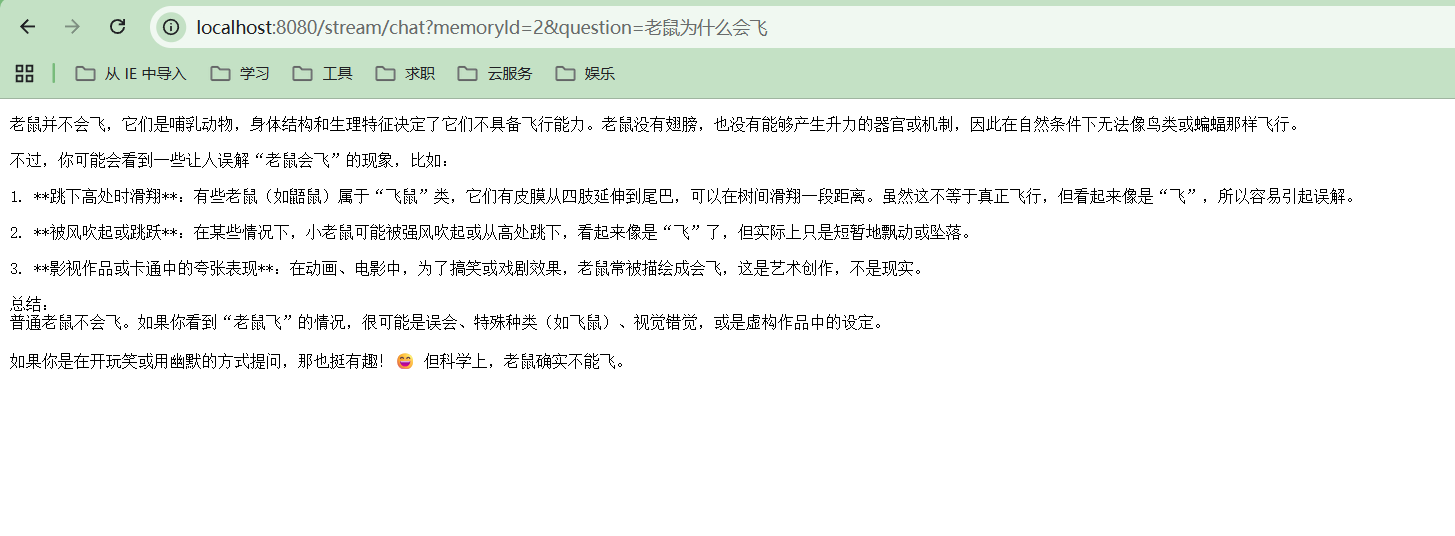
案例:高阶API实现多用户聊天记忆 1 2 3 4 5 6 7 8 9 10 11 12 13 14 15 16 17 18 19 20 21 22 23 24 25 26 27 28 29 public interface StreamingAssistant extends ChatMemoryAccess { TokenStream chatStream (@MemoryId int memoryId, @UserMessage String message) ; } @Bean public StreamingAssistant streamingAssistant () { OpenAiStreamingChatModel model = OpenAiStreamingChatModel.builder() .baseUrl(baseUrl) .apiKey(apiKey) .modelName(modelName) .build(); StreamingAssistant streamingAssistant = AiServices.builder(StreamingAssistant.class) .streamingChatLanguageModel(model) .chatMemoryProvider(memoryId -> MessageWindowChatMemory.withMaxMessages(10 )) .build(); return streamingAssistant; } @GetMapping(value = "/stream/chat", produces = "text/plain;charset=UTF-8") public Flux<String> chatMemory (@RequestParam("memoryId") int memoryId, @RequestParam("question") String question) { TokenStream tokenStream = streamingAssistant.chatStream(memoryId, question); return Flux.create(emitter -> { tokenStream.onPartialResponse(token -> emitter.next(token)) .onCompleteResponse(resp -> emitter.complete()) .onError(emitter::error) .start(); }, FluxSink.OverflowStrategy.BUFFER); }
用户1:
用户2: