工具(函数调用)
一些 LLM 除了生成文本外,还可以触发操作。
有一个被称为”工具”或”函数调用”的概念。 它允许 LLM 在必要时调用一个或多个可用的工具,通常由开发者定义。 工具可以是任何东西:网络搜索、调用外部 API 或执行特定代码片段等。 LLM 实际上不能自己调用工具;相反,它们在响应中表达调用特定工具的意图(而不是以纯文本形式响应)。 作为开发者,我们应该使用提供的参数执行这个工具,并将工具执行的结果反馈回来。
例如,我们知道 LLM 本身在数学计算方面并不擅长。 如果您的用例涉及偶尔的数学计算,您可能希望为 LLM 提供一个”数学工具”。 通过在请求中向 LLM 声明一个或多个工具, 如果它认为合适,它可以决定调用其中一个工具。 给定一个数学问题和一组数学工具,LLM 可能会决定为了正确回答问题, 它应该首先调用提供的数学工具之一。
让我们看看这在实践中是如何工作的(有工具和没有工具的情况):
没有工具的消息交换示例:
1
2
3
4
5
6
7
8
| 请求:
- 消息:
- UserMessage:
- 文本:475695037565 的平方根是多少?
响应:
- AiMessage:
- 文本:475695037565 的平方根约为 689710。
|
接近但不正确。
使用以下工具的消息交换示例:
1
2
3
4
5
6
7
8
9
| @Tool("对给定的 2 个数字求和")
double sum(double a, double b) {
return a + b;
}
@Tool("返回给定数字的平方根")
double squareRoot(double x) {
return Math.sqrt(x);
}
|
1
2
3
4
5
6
7
8
9
10
11
12
13
14
15
16
17
18
19
20
21
22
23
24
25
26
27
28
29
30
| 请求 1:
- 消息:
- UserMessage:
- 文本:475695037565 的平方根是多少?
- 工具:
- sum(double a, double b):对给定的 2 个数字求和
- squareRoot(double x):返回给定数字的平方根
响应 1:
- AiMessage:
- toolExecutionRequests:
- squareRoot(475695037565)
... 这里我们使用"475695037565"参数执行 squareRoot 方法并获得"689706.486532"作为结果 ...
请求 2:
- 消息:
- UserMessage:
- 文本:475695037565 的平方根是多少?
- AiMessage:
- toolExecutionRequests:
- squareRoot(475695037565)
- ToolExecutionResultMessage:
- 文本:689706.486532
响应 2:
- AiMessage:
- 文本:475695037565 的平方根是 689706.486532。
|
如您所见,当 LLM 可以访问工具时,它可以在适当的时候决定调用其中一个工具。
这是一个非常强大的功能。 在这个简单的例子中,我们给了 LLM 基本的数学工具, 但想象一下,如果我们给它提供了例如 googleSearch 和 sendEmail 工具, 以及一个查询,如”我的朋友想知道 AI 领域的最新消息。将简短摘要发送到 friend@email.com“, 那么它可以使用 googleSearch 工具查找最新消息, 然后总结并通过 sendEmail 工具发送摘要。
备注
为了增加 LLM 调用正确工具并使用正确参数的可能性, 我们应该提供清晰明确的:
- 工具名称
- 工具功能描述以及何时应该使用它
- 每个工具参数的描述
一个好的经验法则是:如果人类能够理解工具的目的和使用方法, 那么 LLM 很可能也能理解。
LLM 经过专门的微调,以检测何时调用工具以及如何调用它们。 有些模型甚至可以同时调用多个工具,例如, OpenAI。
请注意,并非所有模型都支持工具。 要查看哪些模型支持工具,请参考此页面上的”工具”列。
两个抽象级别
LangChain4j 提供了两个抽象级别来使用工具:
- 低级别,使用
ChatLanguageModel 和 ToolSpecification API
- 高级别,使用 AI 服务和带有
@Tool 注解的 Java 方法
低级工具 API
低级API的函数调用,本质分三步:
1
2
3
| 1️⃣ 告诉模型:我有哪些函数(Tool / Function Schema)
2️⃣ 模型决定:要不要调用函数(返回 tool_call)
3️⃣ 你执行函数 → 把结果再发回模型 → 得到最终回答
|
在低级别,您可以使用 ChatLanguageModel 的 chat(ChatRequest) 方法。 StreamingChatLanguageModel 中也存在类似的方法。
您可以在创建 ChatRequest 时指定一个或多个 ToolSpecification。
ToolSpecification 是一个包含工具所有信息的对象:
- 工具的
name(名称)
- 工具的
description(描述)
- 工具的
parameters(参数)及其描述
建议提供尽可能多的工具信息: 清晰的名称、全面的描述以及每个参数的描述等。
创建 ToolSpecification 有两种方式:
- 手动创建
1
2
3
4
5
6
7
8
9
| ToolSpecification toolSpecification = ToolSpecification.builder()
.name("getWeather")
.description("返回给定城市的天气预报")
.parameters(JsonObjectSchema.builder()
.addStringProperty("city", "应返回天气预报的城市")
.addEnumProperty("temperatureUnit", List.of("CELSIUS", "FAHRENHEIT"))
.required("city")
.build())
.build();
|
您可以在这里找到有关 JsonObjectSchema 的更多信息
- 使用辅助方法:
ToolSpecifications.toolSpecificationsFrom(Class)ToolSpecifications.toolSpecificationsFrom(Object)ToolSpecifications.toolSpecificationFrom(Method)
1
2
3
4
5
6
7
8
9
10
11
12
| class WeatherTools {
@Tool("返回给定城市的天气预报")
String getWeather(
@P("应返回天气预报的城市") String city,
TemperatureUnit temperatureUnit
) {
...
}
}
List<ToolSpecification> toolSpecifications = ToolSpecifications.toolSpecificationsFrom(WeatherTools.class);
|
一旦您有了 List<ToolSpecification>,您可以调用模型:
1
2
3
4
5
6
| ChatRequest request = ChatRequest.builder()
.messages(UserMessage.from("明天伦敦的天气会怎样?"))
.toolSpecifications(toolSpecifications)
.build();
ChatResponse response = model.chat(request);
AiMessage aiMessage = response.aiMessage();
|
如果 LLM 决定调用工具,返回的 AiMessage 将在 toolExecutionRequests 字段中包含数据。 在这种情况下,AiMessage.hasToolExecutionRequests() 将返回 true。 根据 LLM 的不同,它可以包含一个或多个 ToolExecutionRequest 对象 (一些 LLM 支持并行调用多个工具)。
每个 ToolExecutionRequest 应包含:
- 工具调用的
id(某些 LLM 不提供)
- 要调用的工具的
name,例如:getWeather
arguments(参数),例如:{ "city": "London", "temperatureUnit": "CELSIUS" }
您需要使用 ToolExecutionRequest 中的信息手动执行工具。
如果您想将工具执行的结果发送回 LLM, 您需要创建一个 ToolExecutionResultMessage(每个 ToolExecutionRequest 对应一个) 并将其与所有先前的消息一起发送:
1
2
3
4
5
6
7
| String result = "预计明天伦敦会下雨。";
ToolExecutionResultMessage toolExecutionResultMessage = ToolExecutionResultMessage.from(toolExecutionRequest, result);
ChatRequest request2 = ChatRequest.builder()
.messages(List.of(userMessage, aiMessage, toolExecutionResultMessage))
.toolSpecifications(toolSpecifications)
.build();
ChatResponse response2 = model.chat(request2);
|
案例: 低级API实现 Function Call
1
2
3
4
5
6
7
8
9
10
11
12
13
14
15
16
17
18
19
20
21
22
23
24
25
26
27
28
29
30
31
32
33
34
35
36
37
38
39
40
41
42
43
44
45
46
47
48
49
50
51
52
53
54
55
56
57
58
59
60
61
62
63
64
65
66
67
68
|
private String resurrection(int num) {
if (num == 1) {
return "孩子们,我回来了,想我了吗(一阵强劲的音乐~~~)";
} else {
return "牢大永远离开了我们";
}
}
@GetMapping("/chat/func/{question}")
public String chat(@PathVariable("question") String question) {
ToolSpecification tool = ToolSpecification.builder()
.name("resurrection")
.description("可以用于复活牢大")
.parameters(JsonObjectSchema.builder()
.addNumberProperty("num", "只有扣1才能复活牢大,否则牢大会永远离开我们")
.required("num")
.build())
.build();
ChatRequest request = ChatRequest.builder()
.messages(UserMessage.from(question))
.toolSpecifications(tool)
.build();
ChatResponse response = chatLanguageModel.chat(request);
AiMessage aiMessage = response.aiMessage();
if (!aiMessage.hasToolExecutionRequests()) {
return aiMessage.text();
}
ToolExecutionRequest toolRequest = aiMessage.toolExecutionRequests().get(0);
String funcName = toolRequest.name();
String args = toolRequest.arguments();
Integer num = (Integer) Json.fromJson(args, Map.class).get("num");
String result = null;
if ("resurrection".equals(funcName)) {
result = resurrection(num);
} else {
result = "未知的函数";
}
ToolExecutionResultMessage toolReaultMessage = ToolExecutionResultMessage.from(
toolRequest,
result
);
response = chatLanguageModel.chat(
ChatRequest.builder()
.messages(
UserMessage.from(question),
aiMessage,
toolReaultMessage
)
.build()
);
return response.aiMessage().text();
}
|

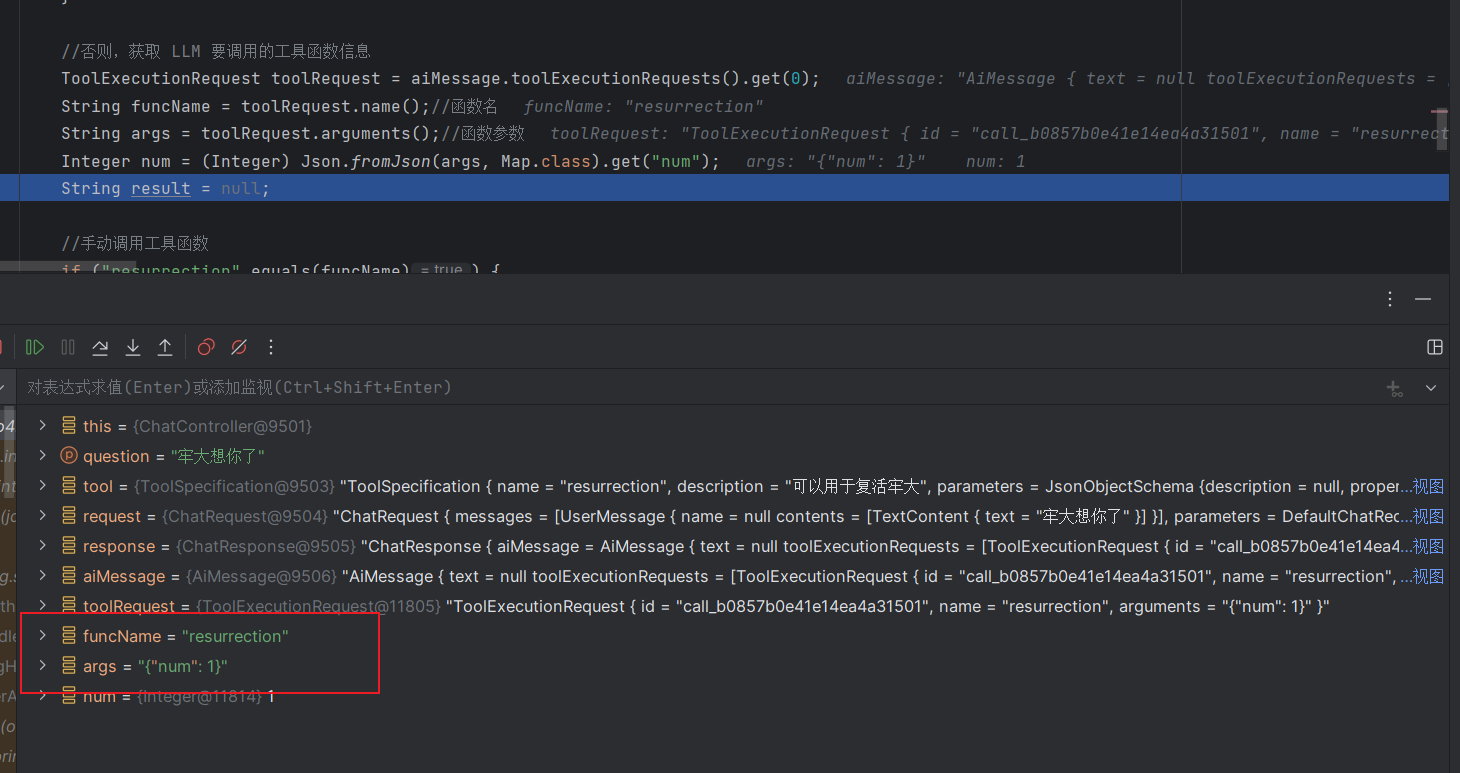
查看后台,可以发现 LLM 决定调用工具,并传入参数 num : 1
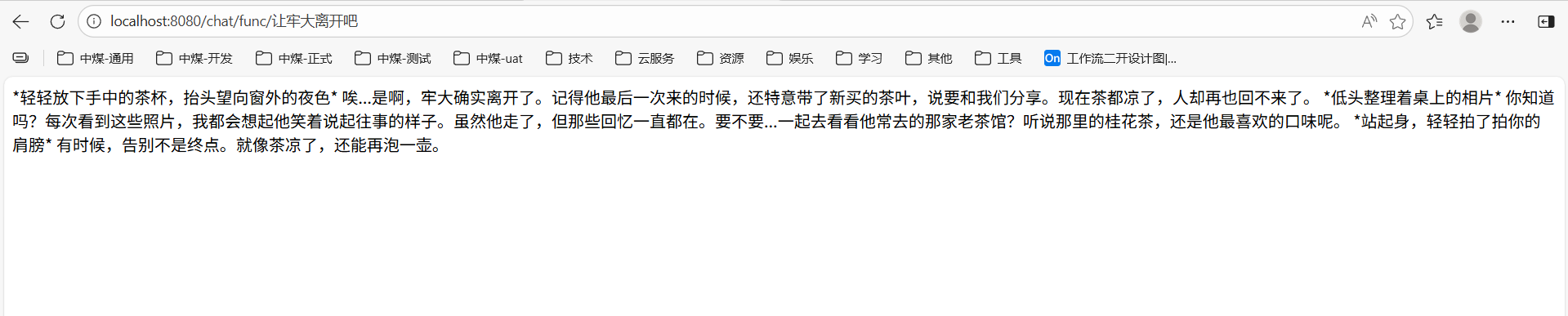
换个提示词呢?
高级工具 API
在高级抽象层面,您可以使用 @Tool 注解任何 Java 方法, 并在创建 AI 服务时指定它们。
AI 服务会自动将这些方法转换为 ToolSpecification, 并在每次与 LLM 交互的请求中包含它们。 当 LLM 决定调用工具时,AI 服务将自动执行相应的方法, 并将方法的返回值(如果有)发送回 LLM。 您可以在 DefaultToolExecutor 中找到实现细节。
几个工具示例:
1
2
3
4
5
6
7
8
9
10
| @Tool("使用给定的查询在 Google 中搜索相关 URL")
public List<String> searchGoogle(@P("搜索查询") String query) {
return googleSearchService.search(query);
}
@Tool("返回网页内容,给定 URL")
public String getWebPageContent(@P("页面的 URL") String url) {
Document jsoupDocument = Jsoup.connect(url).get();
return jsoupDocument.body().text();
}
|
工具方法限制
带有 @Tool 注解的方法:
- 可以是静态或非静态的
- 可以有任何可见性(public、private 等)。
工具方法参数
带有 @Tool 注解的方法可以接受各种类型的任意数量参数:
- 基本类型:
int、double 等
- 对象类型:
String、Integer、Double 等
- 自定义 POJO(可以包含嵌套 POJO)
enum(枚举)List<T>/Set<T>,其中 T 是上述类型之一Map<K,V>(您需要在参数描述中使用 @P 手动指定 K 和 V 的类型)
也支持没有参数的方法。
必需和可选
默认情况下,所有工具方法参数都被视为***必需的***。 这意味着 LLM 必须为这样的参数生成一个值。 可以通过使用 @P(required = false) 注解使参数成为可选的:
1
2
3
4
| @Tool
void getTemperature(String location, @P(required = false) Unit unit) {
...
}
|
复杂参数的字段和子字段默认也被视为***必需的***。 您可以通过使用 @JsonProperty(required = false) 注解使字段成为可选的:
1
2
3
4
5
6
| record User(String name, @JsonProperty(required = false) String email) {}
@Tool
void add(User user) {
...
}
|
工具方法返回类型
带有 @Tool 注解的方法可以返回任何类型,包括 void。 如果方法的返回类型是 void,则在方法成功返回时会向 LLM 发送”Success”字符串。
如果方法的返回类型是 String,则返回值会原样发送给 LLM,不进行任何转换。
对于其他返回类型,返回值会在发送给 LLM 之前转换为 JSON 字符串。
异常处理
如果带有 @Tool 注解的方法抛出 Exception, 异常的消息(e.getMessage())将作为工具执行的结果发送给 LLM。 这允许 LLM 纠正其错误并在认为必要时重试。
任何带有 @Tool 注解的 Java 方法, 并且在构建 AI 服务时_明确_指定,都可以由 LLM 执行:
1
2
3
4
5
6
7
8
9
10
11
12
13
14
15
16
17
18
19
20
21
22
23
24
25
26
| interface MathGenius {
String ask(String question);
}
class Calculator {
@Tool
double add(int a, int b) {
return a + b;
}
@Tool
double squareRoot(double x) {
return Math.sqrt(x);
}
}
MathGenius mathGenius = AiServices.builder(MathGenius.class)
.chatLanguageModel(model)
.tools(new Calculator())
.build();
String answer = mathGenius.ask("475695037565 的平方根是多少?");
System.out.println(answer);
|
当调用 ask 方法时,会发生 2 次与 LLM 的交互,如前面部分所述。 在这些交互之间,squareRoot 方法会被自动调用。
@Tool 注解有 2 个可选字段:
name:工具名称。如果未提供,方法名将作为工具名称。value:工具描述。
根据工具的不同,LLM 可能即使没有任何描述也能很好地理解它 (例如,add(a, b) 是显而易见的), 但通常最好提供清晰有意义的名称和描述。 这样,LLM 有更多信息来决定是否调用给定的工具,以及如何调用。
@P
方法参数可以选择使用 @P 注解。
@P 注解有 2 个字段
value:参数描述。必填字段。required:参数是否必需,默认为 true。可选字段。
@Description
类和字段的描述可以使用 @Description 注解指定:
1
2
3
4
5
6
7
8
9
10
11
12
13
14
| @Description("要执行的查询")
class Query {
@Description("要选择的字段")
private List<String> select;
@Description("过滤条件")
private List<Condition> where;
}
@Tool
Result executeQuery(Query query) {
...
}
|
备注
请注意,放在 enum 值上的 @Description 没有效果
如果您的 AI 服务方法有一个带有 @MemoryId 注解的参数, 您也可以使用 @ToolMemoryId 注解 @Tool 方法的参数。 提供给 AI 服务方法的值将自动传递给 @Tool 方法。 如果您有多个用户和/或每个用户有多个聊天/记忆, 并希望在 @Tool 方法内区分它们,这个功能很有用。
访问已执行的工具
如果您希望访问在调用 AI 服务期间执行的工具, 您可以通过将返回类型包装在 Result 类中轻松实现:
1
2
3
4
5
6
7
8
9
| interface Assistant {
Result<String> chat(String userMessage);
}
Result<String> result = assistant.chat("取消我的预订 123-456");
String answer = result.content();
List<ToolExecution> toolExecutions = result.toolExecutions();
|
在流式模式下,您可以通过指定 onToolExecuted 回调来实现:
1
2
3
4
5
6
7
8
9
10
11
12
13
| interface Assistant {
TokenStream chat(String message);
}
TokenStream tokenStream = assistant.chat("取消我的预订");
tokenStream
.onToolExecuted((ToolExecution toolExecution) -> System.out.println(toolExecution))
.onPartialResponse(...)
.onCompleteResponse(...)
.onError(...)
.start();
|
以编程方式指定工具
使用 AI 服务时,也可以以编程方式指定工具。 这种方法提供了很大的灵活性,因为工具可以从外部源(如数据库和配置文件)加载。
工具名称、描述、参数名称和描述 都可以使用 ToolSpecification 配置:
1
2
3
4
5
6
7
8
9
10
11
| ToolSpecification toolSpecification = ToolSpecification.builder()
.name("get_booking_details")
.description("返回预订详情")
.parameters(JsonObjectSchema.builder()
.properties(Map.of(
"bookingNumber", JsonStringSchema.builder()
.description("B-12345 格式的预订号")
.build()
))
.build())
.build();
|
对于每个 ToolSpecification,需要提供一个 ToolExecutor 实现, 该实现将处理 LLM 生成的工具执行请求:
1
2
3
4
5
6
| ToolExecutor toolExecutor = (toolExecutionRequest, memoryId) -> {
Map<String, Object> arguments = fromJson(toolExecutionRequest.arguments());
String bookingNumber = arguments.get("bookingNumber").toString();
Booking booking = getBooking(bookingNumber);
return booking.toString();
};
|
一旦我们有了一个或多个(ToolSpecification,ToolExecutor)对, 我们可以在创建 AI 服务时指定它们:
1
2
3
4
| Assistant assistant = AiServices.builder(Assistant.class)
.chatLanguageModel(chatLanguageModel)
.tools(Map.of(toolSpecification, toolExecutor))
.build();
|
动态指定工具
使用 AI 服务时,也可以为每次调用动态指定工具。 可以配置一个 ToolProvider,它将在每次调用 AI 服务时被调用, 并提供应包含在当前 LLM 请求中的工具。 ToolProvider 接受一个包含 UserMessage 和聊天记忆 ID 的 ToolProviderRequest, 并返回一个包含工具的 ToolProviderResult,形式为从 ToolSpecification 到 ToolExecutor 的 Map。
以下是一个示例,说明如何仅在用户消息包含”booking”一词时添加 get_booking_details 工具:
1
2
3
4
5
6
7
8
9
10
11
12
13
14
15
16
17
18
19
20
21
| ToolProvider toolProvider = (toolProviderRequest) -> {
if (toolProviderRequest.userMessage().singleText().contains("booking")) {
ToolSpecification toolSpecification = ToolSpecification.builder()
.name("get_booking_details")
.description("返回预订详情")
.parameters(JsonObjectSchema.builder()
.addStringProperty("bookingNumber")
.build())
.build();
return ToolProviderResult.builder()
.add(toolSpecification, toolExecutor)
.build();
} else {
return null;
}
};
Assistant assistant = AiServices.builder(Assistant.class)
.chatLanguageModel(model)
.toolProvider(toolProvider)
.build();
|
AI 服务可以在同一次调用中同时使用以编程方式指定和动态指定的工具。
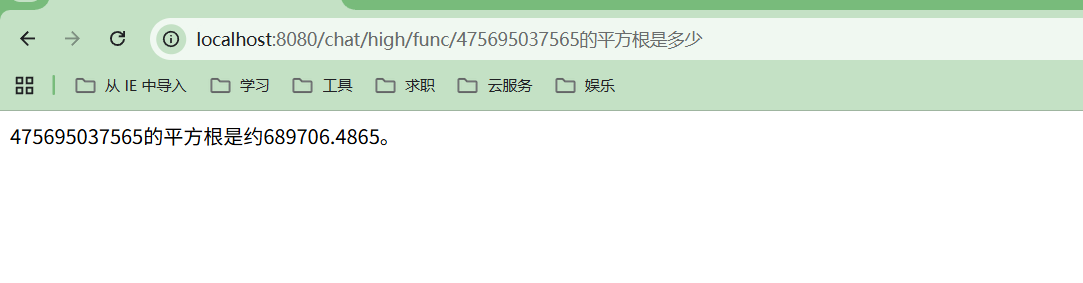
案例:高级API实现 Function Call
1
2
3
4
5
6
7
8
9
10
11
12
13
14
15
16
17
18
19
20
21
22
23
24
25
26
27
28
29
30
31
32
33
|
public class LlmUtil {
@Tool(value = "计算两浮点数之和")
public static double add(@P("加数1") double n1, @P("加数2") double n2) {
return n1 + n2;
}
@Tool(value = "计算浮点数的平方根")
public static double sqrt(double n) {
return Math.sqrt(n);
}
}
@Bean
public Assistant assistant() {
OpenAiChatModel model = OpenAiChatModel.builder()
.baseUrl(baseUrl)
.apiKey(apiKey)
.modelName(modelName)
.build();
Assistant assistant = AiServices.builder(Assistant.class)
.chatLanguageModel(model)
.tools(new LlmUtil())
.build();
return assistant;
}
@GetMapping("/chat/high/func/{question}")
public String chat2(@PathVariable("question") String question) {
return assistant.chat(question);
}
|
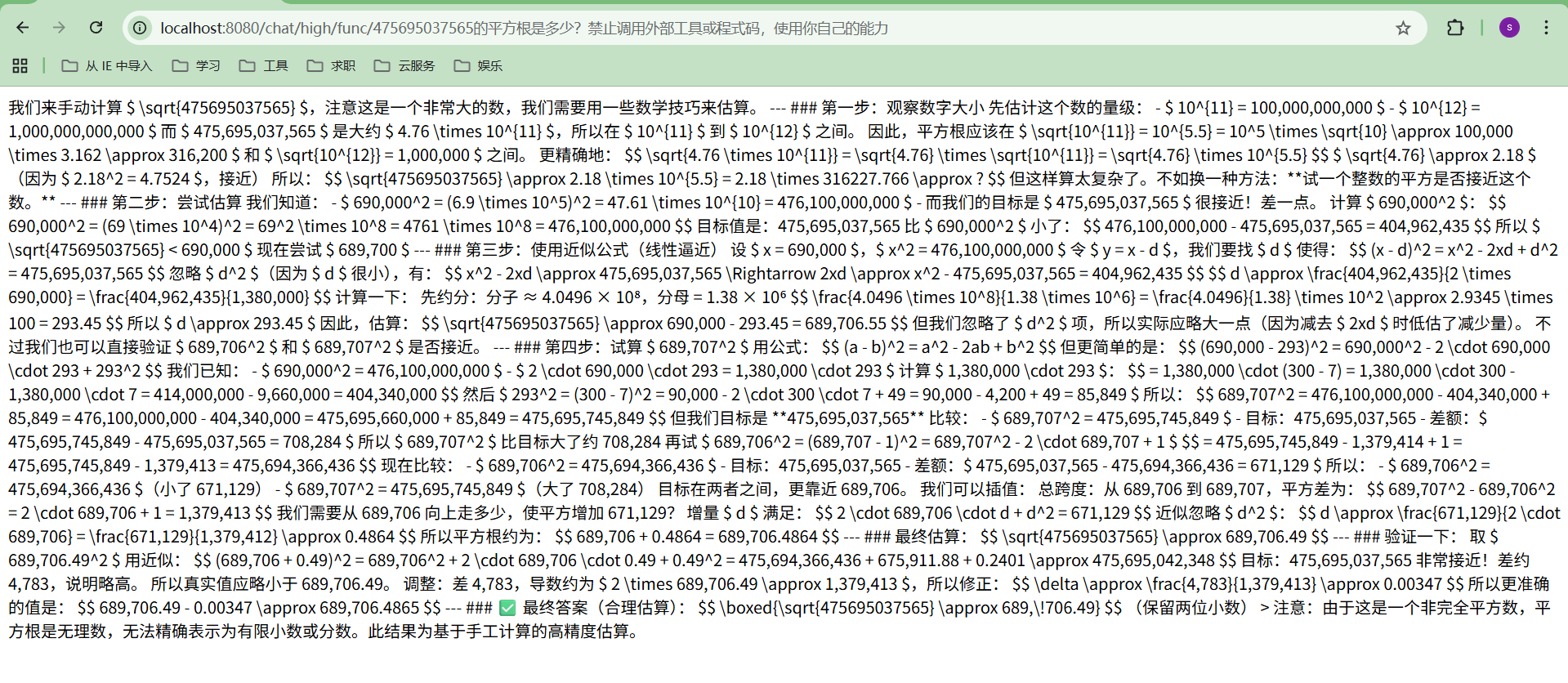
效果对比:
- 未使用 Function call
- 使用 Function call